

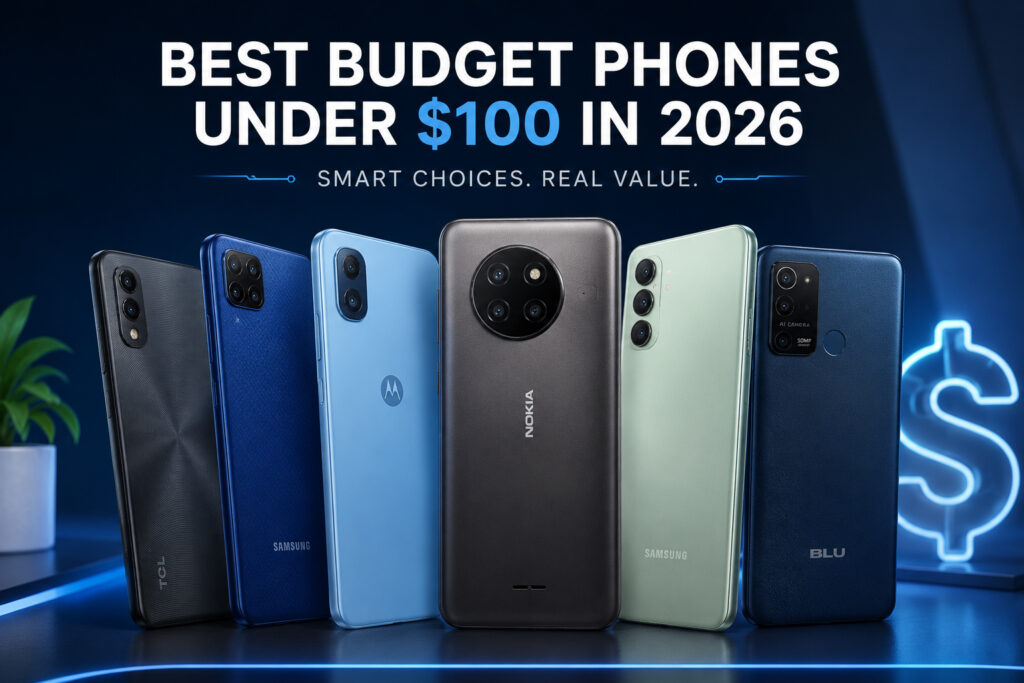
Finding a reliable smartphone for less than $100 isn’t as simple as it used to be. At this price, many listings are carrier-locked, refurbished, used, clearance stock, or tied to a service plan. Slow processors, limited storage, aging batteries, outdated security patches, and unclear network compatibility can quickly turn a bargain into a frustrating purchase.
The five phones examined in detail below originally launched above $100. They qualify for this guide only when the actual checkout price is $100 or less through an immediate discount, a clearly explained carrier offer, or a reputable refurbished/used listing. Trade-in value, future bill credits, and a price that requires an undisclosed plan should not be treated as a normal under-$100 price. A future discount is possible, but it is never guaranteed.
This guide retains the original product list while making its limits explicit. We compared official specifications, manufacturer pricing or launch material where available, age, software status, storage, display, battery capacity, cameras, and likely suitability for light daily tasks. We did not run all of these phones through one controlled hands-on test, so performance, camera, and battery comments are presented as research-based buying guidance—not laboratory findings.
Before buying any older budget handset, verify the exact model number, lock status, U.S. carrier bands and VoLTE support, current Android security patch, battery health, warranty, return window, and total service cost. Readers who can increase the budget may also want to compare our budget-phone guides.
Price and availability rule: None of the five detailed models had a standard U.S. launch price below $100. Include one only after confirming a final price of $100 or less and checking whether it is new, refurbished, used, carrier-locked, or tied to activation. Availability, configurations, network bands, software support, and battery condition vary.
If these conditions feel too restrictive, the choices in our phones under $150 and phones under $200 guides may offer a better balance of age, support, and everyday usability.
📊 Quick Comparison and Price-Status Table
| Phone | Core Hardware | Best Use | Under-$100 Status | Coverage |
|---|---|---|---|---|
| Motorola Moto G Play (2024) | 6.5-inch 90Hz HD+ LCD; 5,000mAh; LTE | Best-balanced conditional pick | $149.99 U.S. launch MSRP; consider only at a verified $100-or-less price | Detailed below |
| Samsung Galaxy A03s | 6.5-inch HD+ LCD; 5,000mAh; LTE | Basic Samsung use | Legacy 2021 model; usually relevant only used, refurbished, or with a carrier offer | Detailed below |
| Nokia G100 | 6.5-inch HD+ LCD; 5,000mAh; LTE | Basic communication | $139.99 U.S. launch price; consider only at a verified $100-or-less price | Detailed below |
| TCL 40 XL | 6.75-inch 90Hz HD+ LCD; 5,000mAh; LTE | Large-screen media | $149 official U.S. listing and sold out at the latest check; sale/refurbished only | Detailed below |
| Samsung Galaxy A04 | 6.5-inch HD+ LCD; 5,000mAh; LTE | Basic Samsung use outside the U.S. | Market-dependent model; verify U.S. bands, warranty, lock status, and final price | Detailed below |
| BLU G93 | 6GB RAM; 128GB storage; Helio G99 | Higher storage/performance on paper | BLU cited a $179 retail price; not a normal under-$100 phone | Reference only |
| Moto G Pure | 6.5-inch HD+ LCD; LTE | Calls and basic apps | $159.99 U.S. launch MSRP; legacy sale/refurbished only | Reference only |
| Nokia C300 | Entry-level LTE hardware | Light daily use | Legacy listing; verify exact SKU, patch level, carrier terms, and price | Reference only |
| TCL 30 Z | Compact entry-level LTE hardware | Backup phone | Carrier-specific legacy model; verify lock and activation requirements | Reference only |
| “Motorola Moto E (2024)” | Exact official U.S. product identity not verified | None until model is confirmed | Do not purchase based on this ambiguous name; require a model number and official specifications | Reference only; not recommended |
Coverage note: The original table contained ten names, but the article provides detailed analysis for only five. The other five are retained as legacy reference entries rather than presented as fully evaluated recommendations. The ambiguous “Motorola Moto E (2024)” label could not be matched to a clearly documented official U.S. product and should not be used as a purchase recommendation without an exact model number.
🔍 How We Selected These Phones
Choosing among budget phones under $100 requires more than comparing specification sheets. Hardware numbers do not guarantee a smooth experience, and an older low-priced phone may have a weak battery, expired security support, a carrier lock, or limited U.S. band compatibility.
To retain the original shortlist while improving accuracy, we compared documented hardware, software age, official pricing or launch information where available, and the compromises most likely to matter. See our review methodology for the site’s broader evaluation approach.
📌 Evaluation Criteria
| Category | What We Looked For |
|---|---|
| Performance | Hardware and software suitability for calls, messaging, light browsing, email, maps, and basic social apps; no controlled speed test was conducted. |
| Display Quality | Readability, brightness, color accuracy, and viewing comfort for everyday use. |
| Battery Life | Battery capacity, charging specification, device age, and the effect of battery health on used or refurbished units. |
| Camera | Documented camera hardware and realistic use cases; no side-by-side camera test was conducted. |
| Software Experience | Ease of use, interface responsiveness, update policy (where available), and minimal unnecessary apps. |
| Build Quality | Durable construction, comfortable design, and overall fit and finish. |
| Connectivity | Reliable support for LTE, Wi-Fi, Bluetooth, GPS, and other essential wireless features. |
| Value for Money | The balance between price, reliability, and long-term usability. |
✔ Our Review Approach
Instead of turning specifications into unsupported performance claims, we considered which buyer situations the documented hardware may suit. The recommendations remain conditional on price, carrier compatibility, security status, battery health, and return protection.
Potential use cases include:
- Students who need an affordable everyday phone.
- Seniors looking for a simple and dependable smartphone.
- Parents buying a first phone for their child.
- Travelers needing a backup device.
- Budget-conscious shoppers who prioritize reliability over premium features.
⚠️ What to Expect From a Phone Under $100
At this price point, every phone involves some compromises. Entry-level smartphones typically prioritize affordability over premium hardware, so it’s important to set realistic expectations.
Common trade-offs include:
- Slower processors compared with mid-range or flagship devices.
- Cameras that perform best in good lighting.
- Basic display technology without premium features.
- Limited storage on some models.
- Longer app loading times during multitasking.
Even with these limitations, a well-chosen budget phone can still handle everyday essentials such as calls, messaging, navigation, video streaming, email, and light social media use with reasonable reliability.
🥇 1. Motorola Moto G Play (2024)
Best-Balanced Conditional Pick Under $100
⭐ Overview
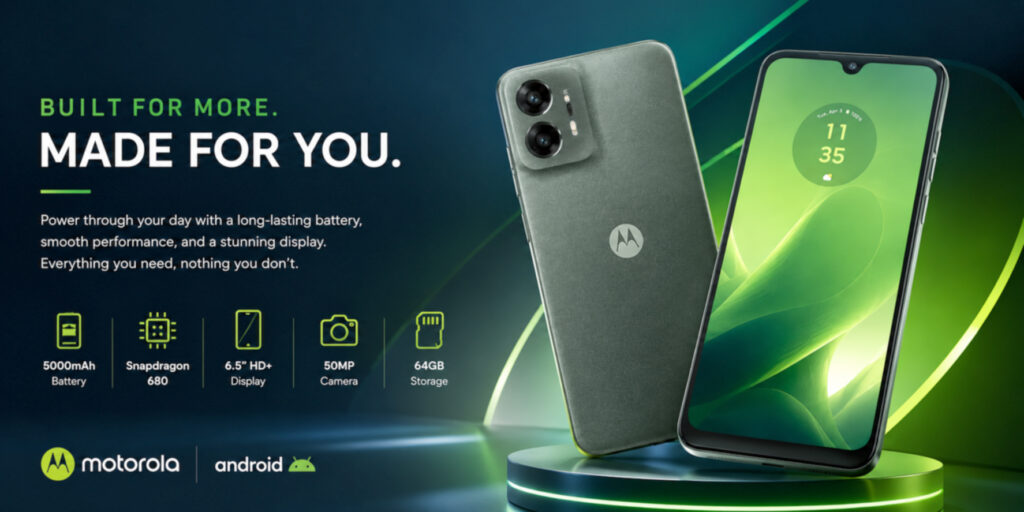
If you’re shopping for a smartphone under $100, the Motorola Moto G Play (2024) is the most current of the five detailed models, but it is still a conditional pick. Motorola launched the unlocked U.S. version at $149.99 MSRP, so include it only when an immediate sale, clearly explained carrier offer, or reputable refurbished listing brings the final price to $100 or less.
Rather than chasing premium features, the Moto G Play combines a 90Hz HD+ display, Snapdragon 680, 4GB of RAM, a 50MP main camera, and a 5,000mAh battery. Those specifications are appropriate for calls, messaging, light browsing, navigation, and media playback, but they do not guarantee identical performance on every unit.
This is not a phone for demanding games or intensive multitasking. Its value depends on a verified sub-$100 price, acceptable condition, current security status, and clear return protection.
Price check: Motorola’s U.S. launch announcement lists a $149.99 unlocked MSRP. Confirm the exact model, final price, lock status, service requirements, warranty, battery condition, and return policy before buying.
📋 Key Specifications
| Feature | Official U.S. Details |
|---|---|
| Operating System | Android 13 at launch; verify the current patch and upgrade status before buying |
| Display | 6.5-inch 1600 × 720 LCD, up to 90Hz, up to 500 nits HBM |
| Processor | Qualcomm Snapdragon 680 4G |
| RAM / Storage | 4GB RAM; 64GB internal storage; microSD support |
| Rear / Front Camera | 50MP main; 8MP front |
| Battery / Charging | 5,000mAh; up to 15W wired charging |
| Security | Side fingerprint reader and face unlock |
| Network | 4G LTE; no 5G |
| Protection | IP52 / water-repellent design; not waterproof |
✅ Pros
- 5,000mAh battery capacity
- Clean Android interface with relatively little pre-installed software
- Comfortable design that’s easy to hold
- Snapdragon 680 is suitable for light daily tasks
- Expandable storage provides additional flexibility
- Fingerprint reader adds convenient security
- Can enter this budget through a verified sale, carrier offer, or refurbished listing
❌ Cons
- HD+ resolution isn’t as sharp as higher-priced competitors
- Cameras perform best only in good lighting
- Charging speed is relatively modest
- Not intended for demanding mobile gaming
- Display brightness can be limited under direct sunlight
⚡ Expected Everyday Performance
Based on its Snapdragon 680, 4GB of RAM, and entry-level software position, the Moto G Play (2024) should be adequate for calls, messaging, and light single-app use. Responsiveness will vary with software version, storage pressure, background apps, network conditions, and the condition of a used or refurbished unit.
Browsing, email, maps, video playback, and light social-media use fit the intended workload. Heavier apps and frequent multitasking are more likely to expose the limits of the entry-level hardware.
Light games may be suitable, but demanding titles can require reduced settings; this guide did not measure frame rates.
On paper, the phone is better aligned with communication, media playback, and basic productivity than intensive workloads.
🖥 Display Expectations
Motorola equips the Moto G Play (2024) with a 6.5-inch 1600 × 720 LCD that can refresh at up to 90Hz.
The size and refresh rate suit browsing, messaging, and video playback, while the HD+ resolution is less detailed than Full HD panels. Motorola lists up to 500 nits in high-brightness mode; actual outdoor readability was not tested here.
Buyers should not expect OLED-level contrast or the sharpness of a higher-resolution display.
📷 Camera Expectations
Camera expectations should remain realistic within the under-$100 segment, and the Moto G Play reflects that reality.
Motorola’s 50MP Quad Pixel sensor is intended primarily for everyday daylight photos. Actual detail, color, focus, and HDR results depend on lighting and software, and were not compared side by side for this guide.
The 8MP front camera is intended for video calls and casual selfies. Because no controlled camera comparison was conducted, buyers who care about low-light photos or video quality should inspect current full-resolution samples from the exact software version before purchasing.
🔋 Battery Considerations
Battery capacity is one of the Moto G Play’s stronger specifications.
Its 5,000mAh battery provides substantial capacity on paper for an entry-level phone.
Motorola advertises up to 46 hours under its own mixed-use test profile, but actual runtime varies. A refurbished phone’s battery health may matter more than its original capacity.
Motorola documents charging at up to 15W, so buyers should not expect current high-speed charging.
💻 Software Considerations
The Moto G Play launched with Android 13 and Motorola’s software additions. Interface preference is subjective, and actual responsiveness depends on the current OS build, free storage, and background apps.
The company’s software update schedule for budget devices is typically more limited than for premium models, so buyers should keep long-term support expectations realistic.
👤 Who Should Buy It
The Motorola Moto G Play (2024) may suit:
- Students looking for an affordable daily smartphone.
- Seniors who value a simple, easy-to-use interface.
- Parents purchasing a first smartphone for a child.
- Users needing a basic backup phone.
- Budget-conscious buyers who prioritize battery capacity over premium features.
- Anyone seeking a clean Android experience without unnecessary complexity.
🚫 Who Should Avoid It
You may want to consider another device if you:
- Play graphics-intensive mobile games regularly.
- Need flagship-level camera performance.
- Frequently edit photos or videos on your phone.
- Require premium display quality.
- Expect years of extensive software support.
- Often run many demanding apps simultaneously.
🏁 Bottom Line
The Motorola Moto G Play (2024) covers the basic hardware expected from an entry-level phone.
Its 90Hz display, Snapdragon 680, 50MP main camera hardware, and 5,000mAh battery make it the best-balanced conditional option in this retained list. Buy only when the verified final price is $100 or less and the device’s lock, battery, warranty, and software status are acceptable.
It is not presented as the fastest phone or the best camera in its class. Its value depends on the actual price and the condition and support status of the exact unit.
Editorial assessment: Best-balanced conditional pick among the five detailed models. No numerical rating is assigned because the phones were not measured together under one documented test protocol.
Best For: Light-use buyers who want a newer model in this retained list and can verify a true sub-$100 deal.
🥈 2. Samsung Galaxy A03s
Best Budget Samsung Phone Under $100 (Refurbished or Discounted)
⭐ Overview
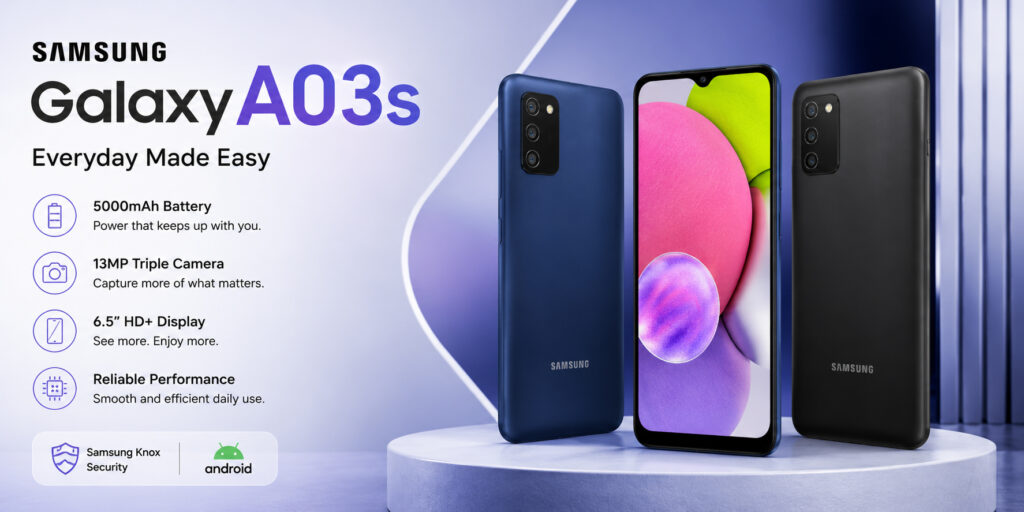
For buyers who prefer Samsung’s ecosystem, the Galaxy A03s is a familiar but aging option. It launched in 2021 and is relevant to an under-$100 guide mainly through used, refurbished, clearance, or carrier-linked offers—not because it is a current standard-price U.S. model.
The Galaxy A03s provides Samsung’s familiar One UI Core interface, expandable storage, and broad accessory availability. Its older Helio P35 platform and limited memory make it suitable only for light use, and perceived ease of use remains personal.
This phone is most relevant to users who already understand Samsung’s interface and accept the limitations of an older entry-level model.
Age and support check: Samsung’s official U.S. unlocked specification sheet documents 3GB RAM, 32GB storage, a 5,000mAh battery, and 7.75W charging. Because this is a 2021 model, verify its current security patch and battery health before using it for banking, work accounts, or long-term ownership.
📋 Key Specifications
| Feature | Documented Details |
|---|---|
| Operating System | Android 11 with One UI Core at launch; verify current patch status |
| Display | 6.5-inch 1600 × 720 PLS TFT LCD, 60Hz on the U.S. unlocked specification sheet |
| Processor | MediaTek Helio P35 |
| RAM / Storage | 3GB / 32GB on the U.S. unlocked version; other markets offered 4GB / 64GB; microSD up to 1TB |
| Rear / Front Camera | 13MP main + 2MP macro + 2MP depth; 5MP front |
| Battery / Charging | 5,000mAh typical; up to 7.75W charging |
| Security | Side-mounted fingerprint sensor |
| Network | 4G LTE; no 5G |
✅ Pros
- Familiar Samsung One UI Core interface
- 5,000mAh battery capacity
- Large display suitable for media consumption
- Expandable storage support
- Wide availability of cases and accessories
❌ Cons
- Older processor and 3GB U.S. configuration leave limited multitasking headroom
- Charging speed is modest
- Camera hardware is basic and was not tested side by side here
- HD+ display lacks the sharpness of higher-resolution screens
- Limited RAM on some versions affects long-term responsiveness
⚡ Expected Everyday Performance
The Galaxy A03s is best limited to basic smartphone activities rather than demanding workloads. Its 2021-era Helio P35 and 3GB U.S. configuration leave little headroom for modern multitasking.
Calls, texting, email, navigation, light browsing, and media playback are the intended workload; actual responsiveness depends on software condition, available storage, carrier software, and background apps.
The Helio P35 is an older entry-level processor. Resource-intensive apps, modern games, and frequent app switching can expose its limited performance headroom.
It may suit a light-use buyer only after the price, condition, support status, and return terms pass the checks above.
🖥 Display Expectations
Samsung includes a 6.5-inch HD+ PLS LCD display that prioritizes screen size over resolution.
The 6.5-inch size provides more viewing area for email, websites, video, and social feeds, while the HD+ resolution is less detailed than Full HD or AMOLED panels.
Brightness, viewing angles, and outdoor readability were not measured for this guide; buyers sensitive to screen quality should inspect the exact unit before the return window closes.
📷 Camera Expectations
Photography is an area where expectations should remain realistic.
The Galaxy A03s uses a 13MP main camera with 2MP macro and depth sensors. That hardware is best approached as a basic daylight system; this guide does not claim measured color or detail performance.
The 5MP front camera is intended for selfies and video calls. Actual daylight, portrait, indoor, and low-light results were not compared here, so camera-focused buyers should review current full-resolution samples.
🔋 Battery Considerations
Battery capacity is one of the Galaxy A03s’ stronger specifications.
Its 5,000mAh battery provides a large capacity for this class, but does not guarantee a full day of regular use that includes messaging, phone calls, web browsing, music streaming, and video playback. A lightly used unit may last longer, but age and battery health can materially change the result.
The official U.S. sheet lists up to 7.75W charging, which is slow by current standards.
💻 Software Considerations
The Galaxy A03s launched with Samsung’s One UI Core over Android 11. It may feel familiar to existing Samsung users, but the interface can place additional demand on entry-level hardware; verify the current OS and patch before purchase.
Buyers who already know Samsung’s Android interface may find the learning curve familiar, but software support should be verified first.
👤 Who Should Buy It
The Samsung Galaxy A03s may suit:
- Existing Samsung users who prefer One UI.
- First-time smartphone buyers.
- Seniors looking for a familiar interface.
- Parents purchasing a phone for children.
- Students with basic communication and study needs.
- Buyers who prioritize battery life over raw performance.
🚫 Who Should Avoid It
You may want to consider another option if you:
- Frequently play demanding mobile games.
- Need faster multitasking performance.
- Want premium camera quality.
- Prefer a lightweight version of Android with minimal customization.
- Expect flagship-level responsiveness from an entry-level device.
⚖️ Motorola Moto G Play (2024) vs Samsung Galaxy A03s
| Feature | Moto G Play (2024) | Galaxy A03s |
|---|---|---|
| Software | Motorola interface | Samsung One UI Core |
| Performance | Snapdragon 680 | Helio P35 |
| Battery Capacity | 5,000mAh | 5,000mAh |
| Main Camera Hardware | 50MP | 13MP |
| Display | Comparable HD+ LCD | Comparable HD+ PLS LCD |
| Best For | Newer conditional option | Samsung ecosystem |
🏁 Bottom Line
The Samsung Galaxy A03s remains a conditional option for buyers who value Samsung’s familiar interface more than raw performance.
Its 6.5-inch display, 5,000mAh battery, expandable storage, and One UI Core may suit light-use buyers. The guide does not claim measured responsiveness or battery endurance.
At $100 or less, the Galaxy A03s can serve a basic user who specifically wants Samsung’s interface. Its age and limited hardware mean it should not be chosen without checking battery health, security-patch status, lock status, and return protection.
Editorial assessment: Conditional Samsung pick for very basic use, provided the price, battery health, and security status are acceptable. No numerical rating is assigned.
Best For: Light-use buyers who prefer Samsung’s interface and can verify security support and battery condition.
🥉 3. Nokia G100
Legacy Basic-Use Pick Under $100 (Conditional)
⭐ Overview
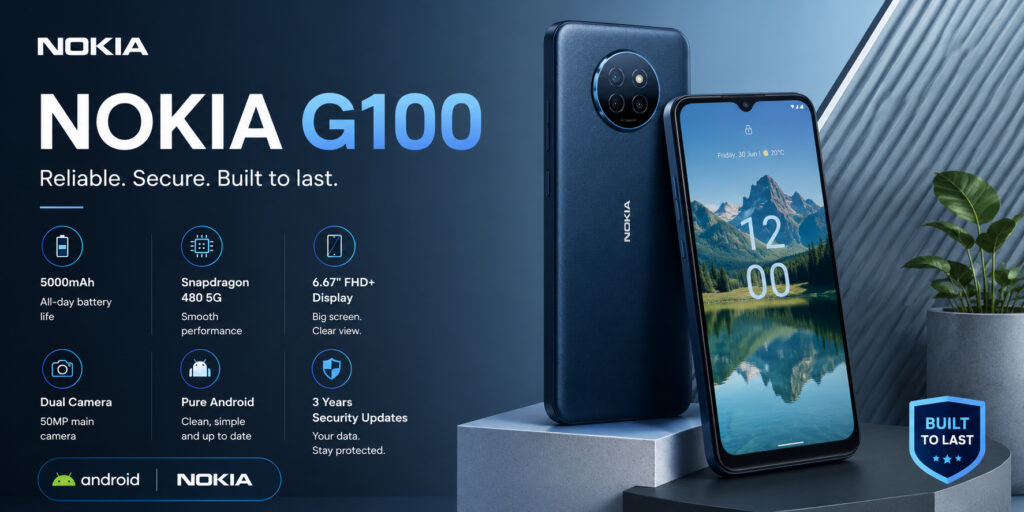
The Nokia G100 is a legacy basic-use option rather than a current long-term-support recommendation. HMD introduced it for U.S. carrier sale in 2022 at $139.99, so it fits this guide only when a verified offer or reputable refurbished listing reaches $100 or less.
The G100 combines Android 12-era software, a Snapdragon 662, a 5,000mAh battery, and a triple-camera system. It is not designed for power users, and its age makes current security support and battery condition more important than the original marketing position.
For calls, messaging, navigation, email, and light entertainment, the Nokia G100 may be adequate when its price and condition are right. For sensitive apps such as banking, first confirm that the device is still receiving security patches.
U.S. price check: HMD’s launch announcement lists the Nokia G100 from $139.99. Confirm the exact carrier SKU, lock status, security patch, battery health, warranty, and return policy; do not assume a future price drop.
📋 Key Specifications
| Feature | Documented Details |
|---|---|
| Operating System | Android 12 at launch; verify current security-patch status |
| Display | Approximately 6.5-inch HD+ LCD |
| Processor | Qualcomm Snapdragon 662 |
| RAM / Storage | Configuration varies by carrier/market; verify the exact SKU before ordering |
| Rear / Front Camera | 13MP main + 8MP ultrawide + 2MP depth; 5MP front |
| Battery | 5,000mAh |
| Security | Side-mounted fingerprint sensor and face unlock |
| Network | 4G LTE; no 5G |
✅ Pros
- Snapdragon 662 platform intended for basic tasks
- 5,000mAh battery capacity
- Textured rear design intended to improve grip
- Expandable storage for additional photos and apps
- Clean Android experience with minimal unnecessary software
- Suitable for seniors and first-time smartphone users
- 4G LTE, Wi-Fi, Bluetooth, GPS, and USB-C connectivity
❌ Cons
- Display resolution is limited to HD+
- Camera struggles in low-light environments
- Performance is not intended for demanding gaming
- Charging speed is relatively slow
- Limited multitasking compared with newer mid-range phones
⚡ Expected Everyday Performance
The Nokia G100’s Snapdragon 662 is intended for basic use rather than speed, and we did not benchmark this unit against the other phones.
Calls, texting, email, light browsing, media playback, and navigation fit its intended workload, but an older unit may feel slower as apps and operating-system requirements change. Rapid app switching can expose limited memory, depending on the exact configuration.
The Snapdragon 662 is an older mid-entry platform. It may have more headroom than the Helio P35 or Helio G37 in some workloads, but this article does not claim a measured speed or stability advantage.
Light games may be suitable, while demanding games may require reduced settings; no frame-rate testing was conducted for this guide.
For light use, the exact unit’s software state, storage pressure, carrier software, and battery condition will shape the experience.
🖥 Display Expectations
The Nokia G100 features an approximately 6.5-inch HD+ LCD display.
Its size provides room for reading, email, and video, while HD+ resolution is less detailed than Full HD. Brightness, color accuracy, viewing angles, and outdoor visibility were not measured here.
📷 Camera Expectations
Photography is functional rather than ambitious.
The Nokia G100 combines a 13MP main camera, 8MP ultrawide, and 2MP depth camera. It offers more framing options than a single-camera phone, but this guide does not claim side-by-side image-quality results.
The 5MP front camera is intended for video calls and casual selfies. Actual daylight and low-light image quality was not compared here, so buyers should inspect current full-resolution samples before relying on it for important photos.
🔋 Battery Considerations
Battery capacity is one of the Nokia G100’s stronger specifications.
Its 5,000mAh battery is substantial on paper, but age, battery health, network conditions, display brightness, and workload can materially change runtime. Confirm the included charger and charging specification for the exact SKU.
💻 Software Considerations
The Nokia G100 launched with Android 12 and a relatively light manufacturer skin. Interface preference is subjective, and an older device’s present-day experience depends heavily on the installed build, security patch, storage pressure, and carrier software.
🛠 Design and Build Notes
The Nokia G100 has a plastic body and textured rear design. Durability, button condition, screen integrity, and frame flex should be inspected on any used or refurbished unit; this guide did not perform a drop or durability test.
📶 Connectivity
The Nokia G100 includes the connectivity features most buyers expect from a budget smartphone.
Connectivity Highlights
- ✔ 4G LTE support
- ✔ Wi-Fi connectivity
- ✔ Bluetooth support
- ✔ GPS for navigation
- ✔ USB-C charging port
- ✔ 3.5mm headphone jack (availability may vary by market)
The phone is limited to 4G LTE. Confirm the exact model’s bands and VoLTE support with the intended carrier before purchase.
👤 Who Should Buy It
The Nokia G100 may suit:
- Seniors seeking a simple smartphone.
- First-time Android users.
- Students with basic communication needs.
- Travelers looking for a basic backup phone.
- Buyers who prioritize battery capacity and simplicity.
- Users who mainly browse, call, text, and stream media.
🚫 Who Should Avoid It
Consider another option if you:
- Frequently play graphics-intensive games.
- Need advanced camera capabilities.
- Edit videos or photos on your phone.
- Expect premium display quality.
- Require 5G connectivity.
- Regularly multitask with many demanding apps.
⚖️ Motorola Moto G Play (2024) vs Samsung Galaxy A03s vs Nokia G100
| Feature | Moto G Play (2024) | Galaxy A03s | Nokia G100 |
|---|---|---|---|
| Software Experience | Clean Android | Samsung One UI | Near-stock Android |
| Performance | Snapdragon 680 | Helio P35 | Snapdragon 662 |
| Battery Capacity | 5,000mAh | 5,000mAh | 5,000mAh |
| Display | HD+ LCD | HD+ PLS LCD | HD+ LCD |
| Camera | 50MP main | 13MP main | 13MP main + 8MP ultrawide |
| Best For | Newer conditional option | Samsung ecosystem | Basic communication |
🏁 Bottom Line
The Nokia G100 provides basic 4G hardware, a 5,000mAh battery, and an ultrawide camera, but its age and support status prevent an unconditional recommendation. It is not intended for demanding gaming or camera-focused use.
At $100 or less, the Nokia G100 is a conditional basic-use option rather than a claim of category-leading reliability. Check the exact Boost/retail SKU, security patch, battery condition, lock status, and return window.
Editorial assessment: Legacy basic-use option at $100 or less, not a long-term-support recommendation. No numerical rating is assigned.
Best For: Light-use buyers who can verify a supported, compatible unit at $100 or less.
🏅 4. TCL 40 XL
Best Budget Phone Under $100 for Entertainment and Large Display (When Discounted or Refurbished)
⭐ Overview
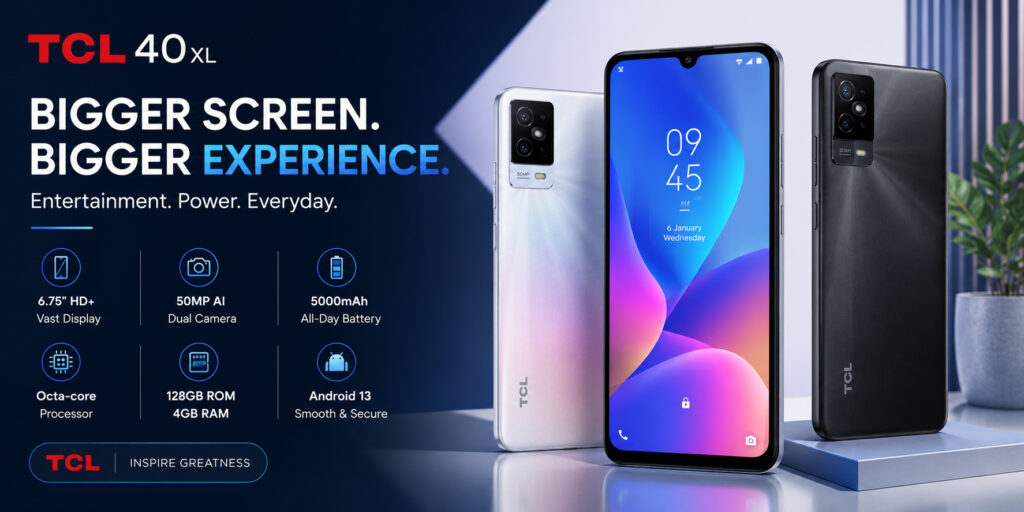
If your priority is a large display for video, social media, or reading, the TCL 40 XL is a conditional legacy option. TCL’s U.S. product listing showed a $149 regular price and was sold out at the latest check, so treat sub-$100 availability as a sale or refurbished opportunity—not a standard price.
The 40 XL’s main differentiator is its 6.75-inch 90Hz HD+ display. It also includes 4GB of RAM, 128GB of storage, a 5,000mAh battery, and Android 13 at launch; current software status still needs to be checked.
This isn’t a performance-focused smartphone. Instead, it’s designed for people who spend more time streaming Netflix, YouTube, TikTok, or browsing the web than playing demanding games.
U.S. status check: TCL’s official 40 Series page documents the 6.75-inch display and triple camera, while its support page provides the exact-model manuals. Verify that a listing is the T608M U.S. model, check carrier compatibility and patch status, and confirm the final price and return terms.
📋 Key Specifications
| Feature | Official U.S. Details |
|---|---|
| Operating System | Android 13 at launch; verify current patch status |
| Display | 6.75-inch 720 × 1600 LCD, 90Hz |
| Processor | MediaTek Helio G37 |
| RAM / Storage | 4GB RAM; 128GB storage; microSD up to 512GB |
| Rear / Front Camera | 50MP main + 2MP depth + 2MP macro; 8MP front |
| Battery | 5,000mAh |
| Security | Side-mounted fingerprint sensor and face unlock |
| Network | 4G LTE; no 5G |
✅ Pros
- Large 6.75-inch display provides more viewing area for video and web browsing
- Generous internal storage for the price
- 5,000mAh battery capacity
- 4GB RAM and Android 13 at launch
- Expandable storage support
- Clean and easy-to-use interface
- Conditional value only when the verified final price is below $100
❌ Cons
- HD+ resolution isn’t as sharp as Full HD displays
- Camera quality decreases noticeably in low-light conditions
- Gaming performance is limited
- Display brightness may struggle outdoors
- Charging speed is average
⚡ Expected Everyday Performance
The TCL 40 XL’s Helio G37 and 4GB of RAM target light use; this guide does not present a measured speed or multitasking result.
Calling, texting, email, light browsing, media playback, and navigation fit the documented hardware, while heavier apps and multitasking can expose its entry-level limits.
The MediaTek Helio G37 processor isn’t built for heavy multitasking. Messaging, music streaming, and light browsing fit its intended workload, but app-launch and switching speed were not measured here.
Lightweight games may be suitable, while demanding games can require lower settings; this guide did not measure sustained frame rates.
🖥 Display Expectations
The TCL 40 XL’s largest differentiator is its screen size.
Its 6.75-inch HD+ LCD panel provides plenty of screen space for streaming movies, reading articles, participating in video calls, and browsing social media.
The larger panel provides more viewing area, but HD+ resolution spreads fewer pixels across that size than a Full HD panel. Color, contrast, and outdoor visibility were not measured for this guide.
📷 Camera Expectations
The TCL 40 XL’s camera system is best described as practical.
The TCL 40 XL uses a 50MP main camera with 2MP depth and macro sensors. It is intended for everyday daylight photos, but actual detail, color, and focus were not measured against the other phones.
The 8MP front camera is intended for video calls and casual selfies. Actual indoor, daylight, and low-light quality was not compared here, so buyers who care about camera output should inspect current full-resolution samples.
🔋 Battery Considerations
The TCL 40 XL includes a 5,000mAh battery.
The 5,000mAh battery provides a large capacity for this class, but does not guarantee a full day of regular use, including web browsing, messaging, streaming video, and social media.
Actual runtime depends on battery health, brightness, signal strength, workload, and software. Buyers should confirm the included charger and charging specification for the exact listing.
💻 Software Considerations
The TCL 40 XL launched with Android 13 and TCL’s interface. Usability is subjective, and actual responsiveness depends on the current build, free storage, background apps, and carrier software.
Software support for entry-level smartphones is generally more limited than flagship devices, so buyers should prioritize the phone’s current features rather than expecting many years of major Android upgrades.
🛠 Design and Build Notes
The TCL 40 XL uses a plastic construction and a side-mounted fingerprint sensor. Buyers should check grip and reach in person if possible; used or refurbished units should also be inspected for frame, button, port, and screen damage.
📶 Connectivity
The TCL 40 XL includes the essential connectivity features expected from a modern budget smartphone.
Connectivity Highlights
- ✔ 4G LTE support
- ✔ Wi-Fi connectivity
- ✔ Bluetooth support
- ✔ GPS navigation
- ✔ USB-C charging
- ✔ Expandable storage via microSD
- ✔ 3.5mm headphone jack (availability may vary)
The phone is limited to 4G LTE. Confirm band and VoLTE compatibility with the intended carrier before purchase.
👤 Who Should Buy It
The TCL 40 XL may suit:
- Users who enjoy watching YouTube or Netflix on a larger screen.
- Seniors who prefer larger text and icons.
- Students attending online classes.
- Casual social media users.
- Budget-conscious buyers who value storage capacity.
- Anyone who finds a verified T608M unit under $100 with acceptable support and return terms.
🚫 Who Should Avoid It
Consider another phone if you:
- Play graphics-intensive games regularly.
- Need flagship-quality photography.
- Spend significant time editing videos or photos.
- Require 5G connectivity.
- Want a brighter display for frequent outdoor use.
- Expect premium-level performance.
⚖️ Quick Comparison
| Feature | Moto G Play (2024) | Galaxy A03s | Nokia G100 | TCL 40 XL |
|---|---|---|---|---|
| Processor | Snapdragon 680 | Helio P35 | Snapdragon 662 | Helio G37 |
| Display | 6.5-inch, 90Hz | 6.5-inch, 60Hz U.S. spec | About 6.5-inch | 6.75-inch, 90Hz |
| Battery Capacity | 5,000mAh | 5,000mAh | 5,000mAh | 5,000mAh |
| Main Camera Hardware | 50MP | 13MP | 13MP | 50MP |
| Price Position | $149.99 launch MSRP | Legacy/conditional | $139.99 launch price | $149 official listing |
| Conditional Role | Best-balanced pick | Samsung familiarity | Basic communication | Largest display |
🏁 Bottom Line
The TCL 40 XL stands out in this retained list through its 6.75-inch display and 128GB storage. Those specifications may appeal to buyers focused on video, reading, and light daily use, but they do not establish measured battery life or responsiveness.
Buyers looking for demanding gaming or advanced photography should look elsewhere. The TCL 40 XL is worth considering only when a verified U.S. T608M unit costs $100 or less. Confirm software status, carrier compatibility, condition, warranty, and return terms.
Editorial assessment: Large-screen conditional pick when a verified T608M listing costs $100 or less. No numerical rating is assigned.
Best For: Entertainment, video streaming, students, seniors, and buyers who want a large-screen smartphone without stretching their budget.
🏅 5. Samsung Galaxy A04
Market-Dependent Samsung Option Under $100 (Conditional)
⭐ Overview
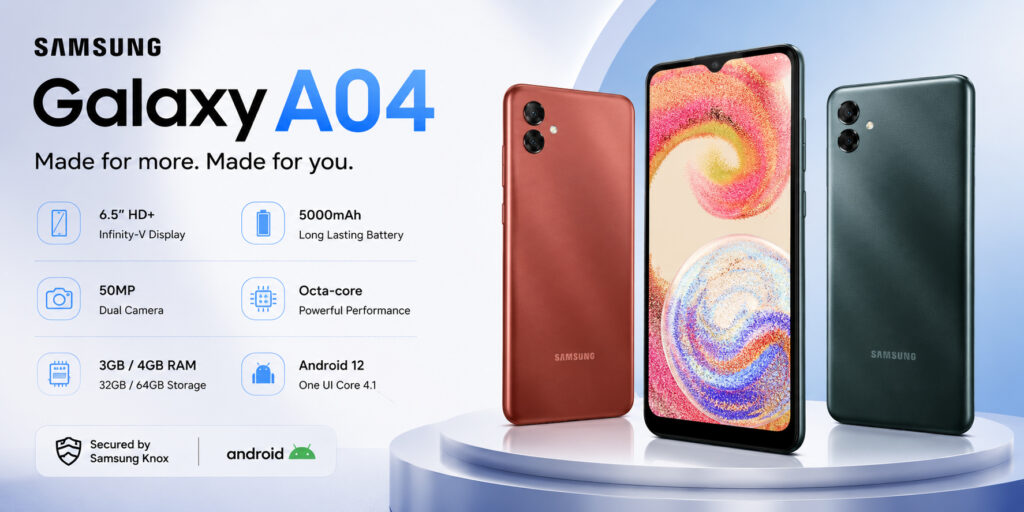
The Samsung Galaxy A04 is a market-dependent legacy option for buyers who prefer Samsung’s interface. It was not positioned as a standard unlocked U.S. model, so a low import or marketplace price must be weighed against band compatibility, warranty coverage, lock status, software support, and return protection.
The Galaxy A04 combines a 6.5-inch HD+ display, a 5,000mAh battery, a 50MP main camera, and One UI Core. It does not compete with current mid-range Galaxy phones, and its everyday suitability depends on the exact regional configuration and software status.
For first-time smartphone owners, seniors, students, and anyone who prefers Samsung’s software ecosystem, the Galaxy A04 may be relevant only after its regional configuration and current support status are verified.
Market and specification check: Samsung’s official Galaxy A04 page documents the display, 50MP main camera, memory options, and 5,000mAh battery, but configurations vary by country. U.S. buyers should verify LTE bands, VoLTE, warranty, software patch, and the exact SM-A045 model before ordering.
📋 Key Specifications
| Feature | Documented Details |
|---|---|
| Operating System | Android with One UI Core 4.1 at launch; verify current patch status |
| Display | 6.5-inch 720 × 1600 PLS LCD |
| Processor | Octa-core, up to 2.3GHz + 1.8GHz; exact chipset can depend on the market/SKU |
| RAM / Storage | 3GB or 4GB RAM and 32GB, 64GB, or 128GB storage depending on market; microSD up to 1TB |
| Rear / Front Camera | 50MP main + 2MP depth; 5MP front |
| Battery | 5,000mAh typical |
| Security | Face unlock; do not assume a fingerprint reader without checking the exact SKU |
| Network | 4G LTE; bands and SIM configuration vary by market |
✅ Pros
- Large 6.5-inch display for media consumption
- 5,000mAh battery capacity
- Familiar Samsung One UI Core software
- Expandable storage support
- Lightweight plastic design
- Conditional value when the verified total price is below $100
- Hardware intended for basic tasks
❌ Cons
- HD+ resolution lacks the sharpness of Full HD displays
- Processor struggles with demanding applications
- Camera performance drops noticeably in poor lighting
- Charging speed is relatively slow
- Some variants do not include a fingerprint sensor
⚡ Expected Everyday Performance
The Galaxy A04 is designed for everyday smartphone users rather than performance enthusiasts.
Basic tasks—including calls, messages, email, maps, media playback, and light browsing—fit the Galaxy A04’s intended use. Before installing banking or work apps, confirm the phone’s current security patch and official app compatibility.
App-launch speed was not measured here. The entry-level processor and limited memory can make heavy multitasking, large-photo editing, and rapid app switching a poor fit.
For light use, the phone may remain serviceable when the exact unit is in good condition, but this guide does not claim measured app speed or multitasking performance.
Lightweight games may be suitable; demanding games can require lower settings, and no frame-rate testing was conducted here.
🖥 Display Expectations
Samsung equips the Galaxy A04 with a 6.5-inch HD+ PLS LCD display that prioritizes screen size over resolution.
The 6.5-inch size provides room for reading, browsing, video, and calls, while HD+ resolution is less detailed than Full HD and the PLS LCD does not provide AMOLED-level contrast. Color, brightness, and outdoor visibility were not measured here.
📷 Camera Expectations
The Galaxy A04 has basic dual-camera hardware.
The Galaxy A04 uses a 50MP main camera with a 2MP depth sensor. It is intended for everyday photos in adequate light, but this guide does not claim measured color, detail, or low-light superiority.
The 5MP front camera is intended for selfies and video calls. Actual indoor and low-light results were not measured, so camera-focused buyers should inspect current full-resolution samples from the exact model and software version.
🔋 Battery Considerations
Battery capacity is one of the Galaxy A04’s stronger specifications.
The 5,000mAh battery provides a large capacity for this class, but does not guarantee a full day of typical use, including messaging, social media, streaming, navigation, and casual photography.
Age and battery health can materially change runtime. Confirm the charger, charging specification, and battery condition for the exact regional unit.
💻 Software Considerations
The Galaxy A04 launched with Samsung’s One UI Core, which may feel familiar to existing Samsung users.
Compared with stock Android, One UI includes additional customization options, accessibility features, and useful Samsung utilities. Some pre-installed applications are included, though many can be disabled if not needed.
The current experience depends on the installed build, security patch, available storage, and exact memory configuration.
🛠 Design and Build Notes
The Galaxy A04 has a plastic body, rounded edges, and a relatively light design. Because build quality was not stress-tested here, used or imported units should be checked for screen, frame, port, and button damage.
📶 Connectivity
The Galaxy A04 includes the essential wireless features expected from a modern budget smartphone.
Connectivity Highlights
- ✔ 4G LTE support
- ✔ Wi-Fi
- ✔ Bluetooth
- ✔ GPS navigation
- ✔ USB-C charging port
- ✔ microSD card expansion
- ✔ 3.5mm headphone jack (availability varies by market)
The Galaxy A04 is limited to 4G LTE, and band/VoLTE compatibility varies by regional SKU. Verify it with the intended U.S. carrier before purchase.
👤 Who Should Buy It
The Samsung Galaxy A04 may suit:
- Samsung fans on a limited budget.
- Students needing a basic daily smartphone.
- Seniors who appreciate a familiar interface.
- Parents purchasing a first smartphone for children.
- Casual users focused on communication and entertainment.
- Buyers who value battery capacity over high-end performance.
🚫 Who Should Avoid It
You may want to consider another phone if you:
- Frequently play demanding mobile games.
- Need advanced photography capabilities.
- Want faster charging technology.
- Expect premium multitasking performance.
- Require 5G connectivity.
- Edit videos or large photos regularly.
⚖️ Quick Comparison
| Feature | Moto G Play (2024) | Galaxy A03s | Nokia G100 | TCL 40 XL | Galaxy A04 |
|---|---|---|---|---|---|
| Launch OS | Android 13 | Android 11 | Android 12 | Android 13 | One UI Core 4.1 generation |
| Display | 6.5-inch, 90Hz | 6.5-inch, 60Hz U.S. spec | About 6.5-inch | 6.75-inch, 90Hz | 6.5-inch |
| Battery Capacity | 5,000mAh | 5,000mAh | 5,000mAh | 5,000mAh | 5,000mAh |
| Main Camera Hardware | 50MP | 13MP | 13MP | 50MP | 50MP |
| Primary Buying Risk | Above-budget MSRP | Age/support | Age/carrier SKU | Sold-out legacy stock | U.S. compatibility/import |
| Conditional Role | Best-balanced pick | Samsung familiarity | Basic communication | Largest display | Samsung interface outside U.S. |
🏁 Bottom Line
The Samsung Galaxy A04 combines a 6.5-inch display, 5,000mAh battery, expandable storage, and One UI Core, but its regional variants and uncertain U.S. compatibility prevent an unconditional recommendation.
At $100 or less, the Galaxy A04 may suit a basic user who prefers Samsung’s interface, but it is not automatically a safe U.S. purchase. Confirm the exact model, LTE/VoLTE compatibility, security patch, battery condition, warranty, and return policy.
Editorial assessment: Market-dependent Samsung option only after compatibility and support checks. No numerical rating is assigned.
Best For: Light-use buyers who prefer Samsung and can verify the exact regional model, carrier compatibility, and support status.
🏁 Final Verdict
Among the five phones analyzed in detail, the Motorola Moto G Play (2024) is the best-balanced conditional pick because it is newer and has the strongest overall combination of documented hardware. Its official U.S. launch MSRP was $149.99, however, so it belongs in this guide only when the verified final price reaches $100 or less without hiding the cost in a trade-in or long-term bill credit.
The TCL 40 XL is the large-screen alternative, while the Galaxy A03s, Nokia G100, and Galaxy A04 are older or market-dependent choices that require stricter checks. A low price does not compensate for an unsupported security patch, worn battery, carrier lock, incompatible LTE bands, missing warranty, or poor return policy.
If every available listing has one of those problems, do not force an under-$100 purchase. Spending slightly more on a newer device from our Android phone guides may provide better software support, network compatibility, battery condition, and overall value.
Before You Pay
- Confirm that the final checkout price is $100 or less and separate it from trade-in value or future bill credits.
- Verify whether the phone is new, renewed, refurbished, or used and who performed the refurbishment.
- Check the exact model number, carrier lock, LTE bands, VoLTE support, and activation requirements.
- Open the device’s settings or request proof of the Android version and security-patch date.
- Ask about battery health, included charger, warranty, and return window.
- Avoid any listing that uses an ambiguous model name, especially the unverified “Motorola Moto E (2024)” label in the legacy reference table.