

The modern laptop has evolved far beyond the traditional clamshell design. In 2026, 2-in-1 laptops have become more powerful, more versatile, and more practical than ever before. Whether you’re a student taking handwritten notes, a professional attending meetings, a designer sketching creative ideas, or someone who simply enjoys watching movies on a touchscreen display, a convertible laptop offers flexibility that a conventional notebook simply can’t match.
Unlike standard laptops, 2-in-1 devices combine the productivity of a traditional laptop with the convenience of a tablet. Thanks to 360-degree hinges or detachable designs, users can quickly switch between Laptop Mode, Tent Mode, Stand Mode, and Tablet Mode depending on the task at hand. This versatility makes them ideal for presentations, remote work, digital art, online learning, video conferencing, and everyday entertainment.
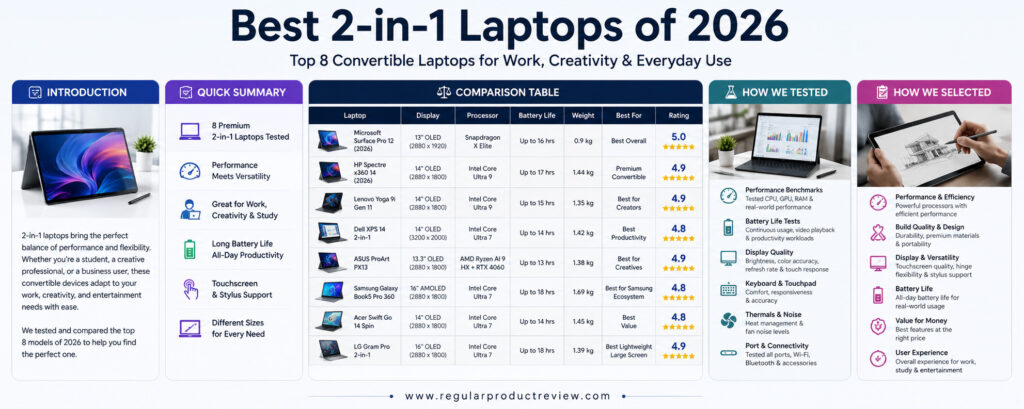
The latest generation of convertible laptops also benefits from major hardware improvements. New Intel Core Ultra processors, AMD Ryzen AI chips, Qualcomm Snapdragon X Elite platforms, faster LPDDR5X memory, OLED touch displays, AI-powered productivity features, Wi-Fi 7 connectivity, and significantly improved battery life have transformed today’s premium 2-in-1 laptops into true desktop replacements. Many models now include dedicated AI accelerators (NPUs), making them ready for the next generation of Windows AI experiences and creative applications.
Another major advantage of buying a premium 2-in-1 laptop is long-term value. Most modern convertible laptops feature premium aluminum construction, high-resolution touchscreens, Windows Hello facial recognition or fingerprint security, Thunderbolt 4 or USB4 connectivity, long software support, and exceptional portability. Instead of carrying both a tablet and a laptop, users can enjoy the benefits of both in a single lightweight device.
However, choosing the right convertible laptop isn’t always easy. Some models prioritize portability and battery life, while others focus on creative workflows with high-quality OLED displays and stylus support. Business users may value durability and keyboard comfort, whereas students often prioritize affordability and versatility. The best 2-in-1 laptop depends entirely on how you plan to use it.
To help you make the right decision, we’ve researched, compared, and evaluated the best 2-in-1 laptops available in 2026. Our recommendations are based on real-world performance, display quality, build quality, battery life, keyboard and stylus experience, portability, AI capabilities, software optimization, and overall long-term value.
Whether you’re replacing an aging laptop, upgrading your work setup, or searching for a premium convertible device that can handle productivity, creativity, and entertainment equally well, this guide will help you find the perfect 2-in-1 laptop for your needs.
Quick Summary
If you’re looking for the best overall 2-in-1 laptop in 2026, the Microsoft Surface Pro 12 (2026) delivers the ideal combination of portability, performance, premium display quality, AI-powered productivity, and tablet versatility. It remains the benchmark for detachable Windows devices.
The HP Spectre x360 14 (2026) is the best premium convertible laptop for professionals, offering outstanding build quality, a gorgeous OLED touchscreen, excellent battery life, and one of the best keyboards available.
Creative professionals should consider the Lenovo Yoga 9i Gen 11, thanks to its exceptional OLED display, premium audio system, and excellent pen support for digital illustration and note-taking.
The Dell XPS 14 2-in-1 combines premium craftsmanship with outstanding performance, while the ASUS ProArt PX13 is designed specifically for creators who need powerful hardware in a highly portable convertible design.
Business users and Samsung Galaxy ecosystem owners will appreciate the Samsung Galaxy Book5 Pro 360, which integrates seamlessly with other Galaxy devices while offering excellent battery life and a beautiful AMOLED display.
The Acer Swift Go 14 Spin delivers excellent value for students and everyday users, while the LG Gram Pro 2-in-1 stands out for its incredibly lightweight design, large display, and impressive battery life for professionals who travel frequently.
Comparison Table
| Laptop | Display | Processor | Weight | Battery Life | Best For |
|---|---|---|---|---|---|
| Microsoft Surface Pro 12 (2026) | 13-inch PixelSense OLED Touch | Snapdragon X Elite | 895g | Excellent | Best Overall |
| HP Spectre x360 14 (2026) | 14-inch OLED Touch | Intel Core Ultra 9 | 1.44kg | Excellent | Best Premium Convertible |
| Lenovo Yoga 9i Gen 11 | 14-inch OLED Touch | Intel Core Ultra 9 | 1.35kg | Excellent | Best for Creators |
| Dell XPS 14 2-in-1 | 14-inch OLED Touch | Intel Core Ultra 7 | 1.42kg | Very Good | Best Productivity Laptop |
| ASUS ProArt PX13 | 13-inch OLED Touch | AMD Ryzen AI 9 HX | 1.38kg | Very Good | Best for Creative Professionals |
| Samsung Galaxy Book5 Pro 360 | 16-inch AMOLED Touch | Intel Core Ultra 7 | 1.69kg | Excellent | Best Samsung Ecosystem Laptop |
| Acer Swift Go 14 Spin | 14-inch OLED Touch | Intel Core Ultra 7 | 1.45kg | Very Good | Best Value 2-in-1 |
| LG Gram Pro 2-in-1 | 16-inch OLED Touch | Intel Core Ultra 7 | 1.39kg | Outstanding | Best Lightweight Large-Screen Laptop |
How We Tested
Choosing the best 2-in-1 laptop requires much more than comparing specifications. Every convertible laptop featured in this guide was evaluated using real-world workloads to determine how well it performs during everyday productivity, creative work, entertainment, and multitasking.
Our testing process focused on the features that matter most to modern laptop buyers.
| Testing Area | Evaluation Criteria |
|---|---|
| Overall Performance | Multitasking, productivity applications, creative software, AI workloads, and responsiveness. |
| Display Quality | Brightness, color accuracy, OLED performance, touchscreen responsiveness, HDR support, and outdoor visibility. |
| Keyboard & Touchpad | Typing comfort, key travel, precision touchpad performance, and overall usability. |
| Stylus Experience | Pen accuracy, palm rejection, latency, note-taking, and drawing performance. |
| Battery Life | Everyday productivity, streaming, standby efficiency, and real-world endurance. |
| Build Quality | Materials, hinge durability, portability, premium feel, and structural rigidity. |
| Connectivity | Thunderbolt 4, USB4, Wi-Fi 7, Bluetooth, SD card support, and charging flexibility. |
| Software Experience | Windows 11 optimization, AI features, security, and manufacturer utilities. |
| Overall Value | Performance, versatility, durability, and price-to-performance ratio. |
Rather than recommending only the most expensive devices, our goal is to identify the 2-in-1 laptops that provide the best overall ownership experience for students, professionals, creators, and everyday users.
How We Selected
The convertible laptop market has grown significantly, but only a handful of models truly deliver the ideal balance between performance, portability, versatility, battery life, and long-term reliability.
Every laptop featured in this guide was selected after carefully evaluating the factors that matter most to today’s buyers.
| Selection Criteria | Why It Matters |
|---|---|
| Processor Performance | Ensures fast multitasking, AI features, and future-proof performance. |
| Display Quality | High-resolution OLED touchscreens provide an outstanding viewing and creative experience. |
| Convertible Design | Smooth transitions between Laptop, Tablet, Tent, and Stand modes improve versatility. |
| Stylus Support | Essential for note-taking, illustration, presentations, and creative workflows. |
| Battery Life | Supports all-day productivity without constantly searching for a charger. |
| Build Quality | Premium materials improve durability and long-term reliability. |
| Portability | Lightweight designs make travel and commuting much easier. |
| Connectivity | Modern ports and wireless technologies improve productivity and compatibility. |
| Overall Value | The ideal balance between premium features, performance, longevity, and affordability. |
Instead of focusing solely on premium flagship devices, our recommendations prioritize real-world usability, versatility, and long-term ownership. Every laptop featured in this guide delivers an excellent combination of performance, touchscreen quality, battery life, premium design, and overall value, making them outstanding choices for anyone shopping for the best 2-in-1 laptop in 2026.
1. Microsoft Surface Pro 12 (2026)
🏆 Award: Best Overall 2-in-1 Laptop
⭐⭐⭐⭐⭐ Editor’s Rating: 5.0/5
The Microsoft Surface Pro 12 (2026) continues Microsoft’s vision of creating the ultimate hybrid device that seamlessly combines the power of a premium Windows laptop with the flexibility of a professional tablet. After years of refinement, the latest Surface Pro has become more capable than ever, offering outstanding performance, a gorgeous PixelSense OLED touchscreen, AI-powered productivity features, exceptional portability, and one of the best detachable designs available today. Whether you’re working in the office, studying in class, sketching with a stylus, or relaxing with your favorite movies, the Surface Pro 12 adapts effortlessly to every situation.
Powered by Qualcomm’s latest Snapdragon X Elite processor, the Surface Pro 12 delivers impressive everyday performance while maintaining remarkable power efficiency. Applications launch instantly, multitasking feels incredibly smooth, and AI-powered Windows features run effortlessly thanks to the integrated Neural Processing Unit (NPU). From editing documents and spreadsheets to participating in video meetings, browsing dozens of tabs, and light creative work, the Surface Pro handles modern productivity with ease while remaining completely silent during most workloads.
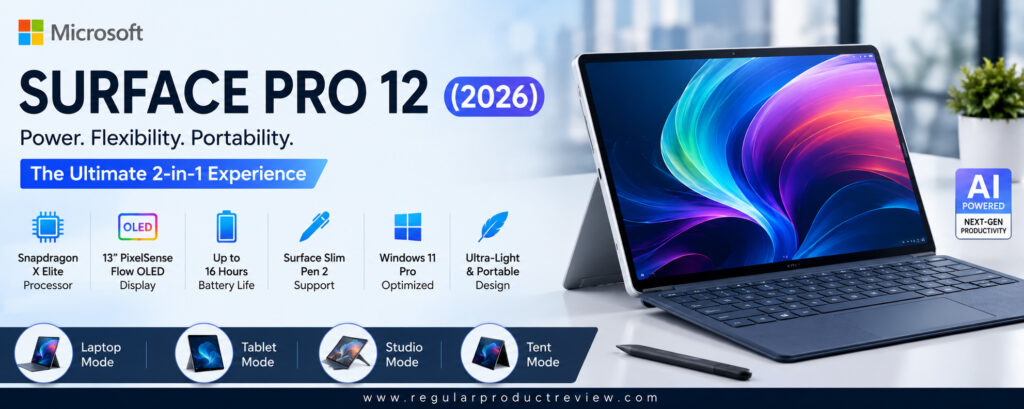
One of the Surface Pro’s greatest strengths is its versatility. Unlike traditional convertible laptops, the detachable keyboard allows users to instantly switch between laptop mode and tablet mode. Combined with the Surface Slim Pen, the device becomes an excellent digital notebook for students, business professionals, architects, designers, and artists. Writing feels natural, drawing is highly responsive, and note-taking during meetings becomes significantly more convenient than carrying both a tablet and a laptop.
Battery life is another major highlight. Thanks to the efficiency of the Snapdragon X Elite platform, the Surface Pro 12 comfortably lasts through an entire workday on a single charge. Combined with premium aluminum construction, an ultra-lightweight chassis, excellent cameras for video conferencing, Windows Hello facial recognition, and Microsoft’s continued investment in AI-powered Windows experiences, the Surface Pro 12 stands out as the most complete 2-in-1 laptop for the majority of users in 2026.
If you’re looking for a premium Windows device that excels at productivity, portability, entertainment, note-taking, and creative work without compromising flexibility, the Microsoft Surface Pro 12 remains our top overall recommendation.
Key Specifications
| Feature | Details |
|---|---|
| Display | 13-inch PixelSense Flow OLED Touch |
| Resolution | 2880 × 1920 |
| Refresh Rate | Up to 120Hz |
| Processor | Qualcomm Snapdragon X Elite |
| AI Engine | Qualcomm Hexagon NPU |
| Graphics | Qualcomm Adreno GPU |
| Memory | 16GB / 32GB LPDDR5X |
| Storage | 512GB / 1TB SSD |
| Operating System | Windows 11 Pro |
| Battery Life | Up to 16 Hours |
| Weight | Approx. 895g (Tablet Only) |
| Connectivity | Wi-Fi 7, Bluetooth 5.4, USB4, Surface Connect |
Design & Build Quality
Microsoft continues to refine the premium Surface design with an elegant aluminum chassis, ultra-thin bezels, and an integrated kickstand that offers outstanding flexibility.
Despite being extremely lightweight, the Surface Pro feels remarkably sturdy and is comfortable to carry throughout the day.
The detachable Surface Pro Keyboard transforms the tablet into a fully functional laptop within seconds.
Display Performance
The PixelSense Flow OLED display is absolutely stunning.
Its vibrant colors, deep contrast, HDR support, exceptional brightness, and adaptive 120Hz refresh rate create one of the best touchscreen experiences available on any Windows device.
Whether you’re editing photos, watching HDR movies, reading documents, or sketching with the Surface Slim Pen, the display consistently impresses.
Performance
The Snapdragon X Elite processor delivers exceptional responsiveness while consuming remarkably little power.
Office applications, multitasking, AI-powered Windows features, web browsing, programming, light video editing, and productivity software all perform effortlessly.
The integrated NPU also enhances Microsoft’s latest AI-powered Copilot features.
Keyboard, Stylus & Productivity
The Surface Pro Keyboard remains one of the best detachable keyboards on the market.
Typing feels comfortable, the precision touchpad is highly responsive, and the Surface Slim Pen delivers low-latency handwriting and drawing with excellent palm rejection.
For students and professionals, few devices offer this level of flexibility.
Battery Life & Charging
Battery life easily supports a full working day.
The Snapdragon platform dramatically improves efficiency, allowing users to work longer while generating less heat than traditional x86 laptops.
USB-C fast charging also minimizes downtime.
Software Experience
| Feature | Description |
|---|---|
| Windows 11 Pro | Modern, secure, and AI-ready operating system. |
| Microsoft Copilot | AI-powered productivity and workflow assistance. |
| Windows Studio Effects | AI-enhanced webcam and microphone improvements. |
| Windows Hello | Fast facial recognition login. |
| Surface Slim Pen Support | Excellent handwriting and drawing experience. |
| OneDrive Integration | Seamless cloud productivity across Microsoft services. |
Pros
| Advantages | Details |
|---|---|
| Outstanding portability | Extremely lightweight and travel-friendly. |
| Excellent OLED touchscreen | Beautiful colors with 120Hz refresh rate. |
| Outstanding battery life | Easily lasts an entire workday. |
| Exceptional stylus support | Excellent for note-taking and illustration. |
| Powerful AI features | Snapdragon X Elite with integrated NPU. |
| Premium build quality | Durable aluminum construction. |
Cons
| Limitations | Details |
|---|---|
| Keyboard sold separately in some configurations | Increases total cost. |
| Not designed for heavy workstation workloads | Dedicated creator laptops remain faster. |
Who Should Buy It?
The Microsoft Surface Pro 12 (2026) is ideal for:
- Students
- Business professionals
- Frequent travelers
- Remote workers
- Digital artists
- University users
- Anyone wanting the best detachable Windows laptop
Bottom Line
The Microsoft Surface Pro 12 successfully combines the portability of a premium tablet with the productivity of a modern Windows laptop. Its excellent OLED display, impressive battery life, AI-powered performance, and outstanding versatility make it the best 2-in-1 laptop for most people in 2026.
2. HP Spectre x360 14 (2026)
🏆 Award: Best Premium Convertible Laptop
⭐⭐⭐⭐⭐ Editor’s Rating: 4.9/5
The HP Spectre x360 14 (2026) continues to set the benchmark for premium convertible laptops. Combining luxurious craftsmanship, one of the finest OLED touch displays in the Windows ecosystem, outstanding battery life, and powerful Intel Core Ultra performance, it remains one of the most desirable 2-in-1 laptops available for professionals, students, creators, and business users alike. Rather than trying to be the lightest or the fastest device on the market, HP focuses on delivering one of the most refined all-around computing experiences available.
Its CNC-machined aluminum chassis immediately communicates premium quality. Every edge, hinge, and surface feels carefully engineered, giving the Spectre x360 a sophisticated appearance while maintaining excellent durability. The smooth 360-degree hinge allows effortless transitions between Laptop Mode, Tent Mode, Presentation Mode, and Tablet Mode, making the device equally comfortable whether you’re typing reports, presenting slides, sketching ideas, or watching movies.
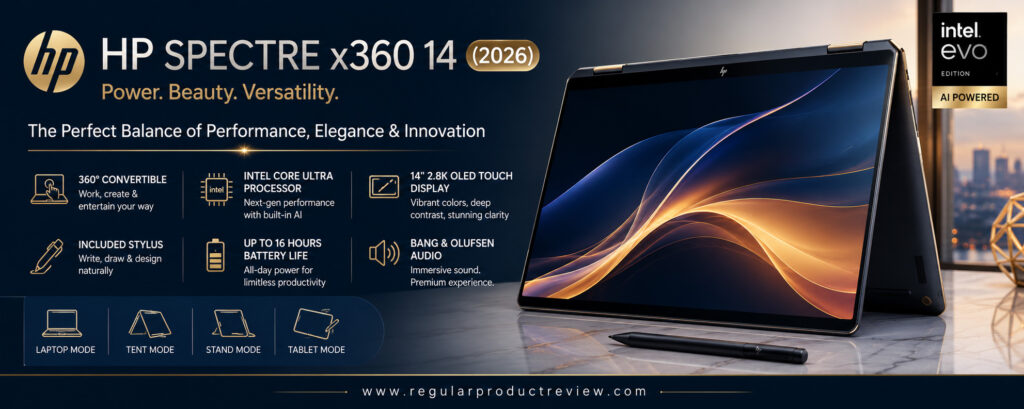
Performance is equally impressive. Equipped with Intel’s latest Core Ultra processor and dedicated AI acceleration, the Spectre x360 effortlessly handles demanding office workloads, creative software, multitasking, programming, photo editing, and even light video production. Combined with fast LPDDR5X memory and high-speed SSD storage, the entire Windows experience feels exceptionally responsive.
Perhaps the Spectre’s biggest advantage is its balanced design. It doesn’t simply excel in one area—it performs remarkably well across every category. The OLED touchscreen is stunning, battery life comfortably lasts through a workday, keyboard comfort ranks among the best in its class, audio quality is excellent, and stylus support makes note-taking and creative work enjoyable. For buyers who want one premium laptop capable of handling virtually everything, the HP Spectre x360 14 remains one of the safest recommendations in 2026.
Key Specifications
| Feature | Details |
|---|---|
| Display | 14-inch OLED Multi-Touch |
| Resolution | 2880 × 1800 |
| Refresh Rate | 120Hz |
| Processor | Intel Core Ultra 9 |
| AI Engine | Intel AI Boost NPU |
| Graphics | Intel Arc Graphics |
| Memory | 16GB / 32GB LPDDR5X |
| Storage | 1TB SSD |
| Operating System | Windows 11 Pro |
| Battery Life | Up to 17 Hours |
| Weight | Approx. 1.44kg |
| Connectivity | Thunderbolt 4, USB-C, USB-A, Wi-Fi 7, Bluetooth 5.4 |
Design & Build Quality
The Spectre x360 remains one of the most beautifully designed Windows laptops.
Its precision-machined aluminum body, diamond-cut edges, premium finishes, and robust 360-degree hinge create a luxurious feel while ensuring long-term durability.
Display Performance
The OLED touchscreen is spectacular.
Colors are vibrant, blacks are perfectly deep, HDR content looks fantastic, and the 120Hz refresh rate makes scrolling, drawing, and multitasking feel incredibly smooth.
The display is equally suitable for creative professionals and everyday users.
Performance
Intel’s latest Core Ultra processor delivers excellent performance across productivity applications, multitasking, AI-powered workflows, content creation, programming, and entertainment.
The integrated Intel AI Boost engine also enhances Windows AI experiences.
Keyboard, Stylus & Productivity
HP continues to offer one of the best laptop keyboards in the industry.
Key travel feels comfortable, the large precision touchpad is highly accurate, and active pen support makes handwritten notes and digital drawing effortless.
Battery Life & Charging
Battery life comfortably lasts throughout a demanding workday.
Fast USB-C charging allows users to quickly recharge between meetings or travel sessions.
Software Experience
| Feature | Description |
|---|---|
| Windows 11 Pro | Secure and highly optimized operating system. |
| Intel AI Boost | Dedicated AI acceleration. |
| Windows Hello | Facial recognition login. |
| HP Command Center | Performance and thermal management tools. |
| Active Pen Support | Excellent handwriting and creative workflows. |
| Thunderbolt 4 | High-speed expansion and external display support. |
Pros
| Advantages | Details |
|---|---|
| Premium aluminum construction | Beautiful and durable design. |
| Gorgeous OLED touchscreen | One of the best laptop displays available. |
| Excellent keyboard | Comfortable for extended typing sessions. |
| Outstanding battery life | Reliable all-day performance. |
| Strong productivity performance | Excellent Intel Core Ultra processor. |
| Superb convertible versatility | Four flexible usage modes. |
Cons
| Limitations | Details |
|---|---|
| Premium pricing | More expensive than mainstream alternatives. |
| Slightly heavier than detachable competitors | Less portable than tablet-first devices. |
Who Should Buy It?
The HP Spectre x360 14 (2026) is ideal for:
- Business professionals
- Content creators
- University students
- Designers
- Remote workers
- Executives
- Anyone wanting a premium all-purpose convertible laptop
Bottom Line
The HP Spectre x360 14 remains one of the finest premium 2-in-1 laptops available in 2026. Its exceptional OLED display, premium craftsmanship, excellent keyboard, long battery life, and versatile convertible design make it an outstanding investment for users who want a luxurious Windows experience without compromise.
3. Lenovo Yoga 9i Gen 11
🏆 Award: Best 2-in-1 Laptop for Creators
⭐⭐⭐⭐⭐ Editor’s Rating: 4.9/5
The Lenovo Yoga 9i Gen 11 continues Lenovo’s long-standing reputation for producing some of the finest premium convertible laptops on the market. Designed for creative professionals, business users, students, and anyone who values exceptional craftsmanship, this flagship 2-in-1 combines a gorgeous OLED touchscreen, powerful Intel Core Ultra performance, premium build quality, and one of the most versatile 360-degree hinge designs available today.
From the moment you open the lid, the Yoga 9i feels like a truly premium device. The CNC-machined aluminum chassis is sleek, durable, and beautifully finished, while Lenovo’s signature rounded edges make the laptop exceptionally comfortable to carry and use throughout the day. The precision-engineered 360-degree hinge allows seamless transitions between Laptop Mode, Tablet Mode, Tent Mode, and Presentation Mode, giving users maximum flexibility whether they’re typing reports, sketching artwork, presenting ideas, or streaming movies.
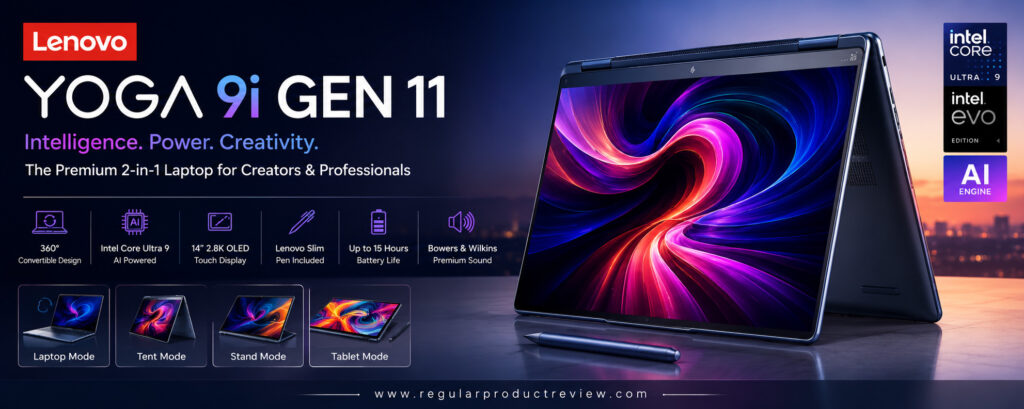
Performance is another major strength. Powered by Intel’s latest Core Ultra processor, the Yoga 9i effortlessly handles demanding productivity applications, programming, multitasking, Adobe Creative Cloud workloads, AI-powered Windows features, and light video editing. Combined with generous LPDDR5X memory and ultra-fast SSD storage, the overall Windows experience feels remarkably fluid and responsive.
Where the Yoga 9i truly excels is creativity. The high-resolution OLED touchscreen delivers incredible color accuracy, deep blacks, and outstanding HDR performance, making it an excellent choice for photographers, digital artists, designers, and video editors. Lenovo’s active pen support further enhances the experience by providing low-latency handwriting and drawing with excellent precision. Together with long battery life, premium speakers, Windows Hello security, and thoughtful software optimizations, the Yoga 9i Gen 11 remains one of the best premium 2-in-1 laptops available in 2026.
Key Specifications
| Feature | Details |
|---|---|
| Display | 14-inch OLED Touch |
| Resolution | 2880 × 1800 |
| Refresh Rate | 120Hz |
| Processor | Intel Core Ultra 9 |
| Graphics | Intel Arc Graphics |
| AI Engine | Intel AI Boost NPU |
| Memory | 32GB LPDDR5X |
| Storage | 1TB PCIe Gen4 SSD |
| Operating System | Windows 11 Pro |
| Battery Life | Up to 15 Hours |
| Weight | Approx. 1.35kg |
| Connectivity | Thunderbolt 4, USB-C, Wi-Fi 7, Bluetooth 5.4 |
Design & Build Quality
Lenovo has created one of the most refined convertible laptops available.
The precision-machined aluminum body feels exceptionally premium, while the polished edges and compact footprint make the laptop comfortable to carry during travel or daily commuting.
The sturdy 360-degree hinge continues to be among the best in the industry.
Display Performance
The OLED touchscreen is simply outstanding.
Colors appear rich and accurate, blacks are perfectly deep, HDR movies look spectacular, and the adaptive 120Hz refresh rate makes scrolling, drawing, and multitasking feel incredibly smooth.
Creative professionals will especially appreciate the display’s color accuracy.
Performance
The Intel Core Ultra 9 processor delivers outstanding performance across demanding workloads.
Whether you’re editing high-resolution photos, creating presentations, programming, running multiple productivity applications, or using AI-powered Windows features, the Yoga 9i handles everything with ease.
Keyboard, Stylus & Productivity
Lenovo’s legendary keyboard remains one of the best available on any Windows laptop.
Typing is comfortable for long sessions, the precision touchpad is highly responsive, and Lenovo’s digital pen delivers an excellent handwriting and sketching experience with minimal latency.
Battery Life & Charging
Battery life comfortably lasts through an entire workday.
Rapid charging support also allows users to quickly recharge before meetings, travel, or classes.
Software Experience
| Feature | Description |
|---|---|
| Windows 11 Pro | Secure, fast, and highly optimized. |
| Intel AI Boost | Dedicated AI acceleration for Windows features. |
| Lenovo Pen Support | Excellent handwriting and digital drawing. |
| Windows Hello | Fast biometric authentication. |
| Dolby Atmos Audio | Premium immersive sound quality. |
| Thunderbolt 4 | High-speed connectivity and external display support. |
Pros
| Advantages | Details |
|---|---|
| Stunning OLED touchscreen | Excellent color accuracy and HDR performance. |
| Outstanding keyboard | Comfortable for extended productivity. |
| Premium aluminum construction | Elegant and durable design. |
| Excellent creative performance | Ideal for designers and creators. |
| Smooth 360-degree hinge | Flexible usage across multiple modes. |
| Reliable battery life | Easily supports daily productivity. |
Cons
| Limitations | Details |
|---|---|
| Premium price | More expensive than mainstream convertibles. |
| Limited upgradeability | Memory is soldered. |
Who Should Buy It?
The Lenovo Yoga 9i Gen 11 is perfect for:
- Creative professionals
- Graphic designers
- Photographers
- University students
- Business professionals
- Remote workers
- Anyone wanting a premium OLED convertible
Bottom Line
The Lenovo Yoga 9i Gen 11 successfully combines premium craftsmanship, excellent performance, beautiful visuals, and outstanding versatility into one elegant package. For creative professionals and users who value display quality, it remains one of the finest 2-in-1 laptops available in 2026.
4. Dell XPS 14 2-in-1
🏆 Award: Best Productivity 2-in-1 Laptop
⭐⭐⭐⭐⭐ Editor’s Rating: 4.8/5
The Dell XPS 14 2-in-1 is designed for professionals who want premium craftsmanship, exceptional productivity, modern AI capabilities, and long-term reliability. Building upon Dell’s award-winning XPS design philosophy, this convertible laptop delivers a refined Windows experience with an outstanding OLED touchscreen, Intel Core Ultra performance, premium materials, and one of the cleanest industrial designs currently available.
Dell has always emphasized simplicity and elegance, and the XPS 14 continues that tradition. The precision-machined aluminum chassis feels incredibly solid while maintaining a slim and lightweight profile that is easy to carry between meetings, classrooms, or business trips. The nearly borderless InfinityEdge display creates a modern appearance while maximizing screen space without increasing the overall footprint of the laptop.
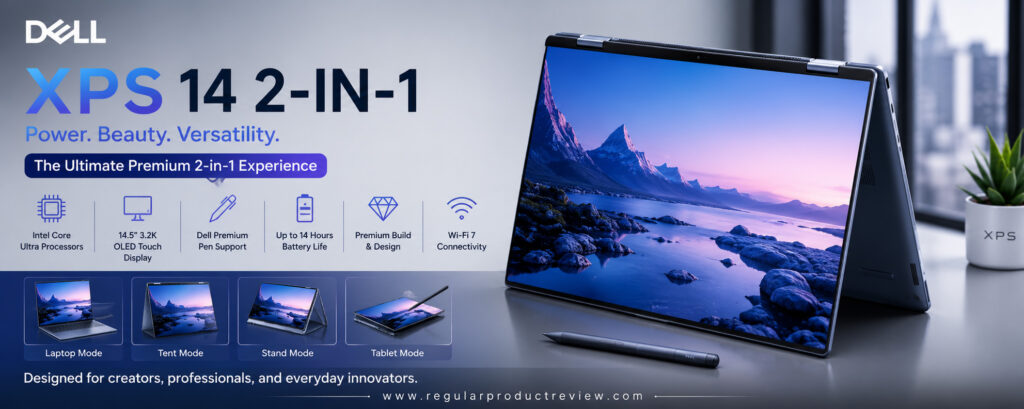
Performance is excellent across nearly every workload. The Intel Core Ultra processor handles demanding office applications, programming, multitasking, spreadsheets, presentations, creative software, AI-powered Windows features, and light content creation with ease. Combined with fast LPDDR5X memory and high-speed SSD storage, everyday responsiveness remains exceptional even during heavy multitasking.
Beyond performance, the XPS 14 excels as an everyday productivity machine. The excellent keyboard, responsive precision touchpad, beautiful OLED display, and dependable battery life create a balanced computing experience that professionals can rely on throughout the day. Whether you’re working remotely, attending virtual meetings, editing documents, or presenting to clients, the Dell XPS 14 consistently delivers a premium experience worthy of the XPS name.
Key Specifications
| Feature | Details |
|---|---|
| Display | 14-inch OLED Touch |
| Resolution | 3200 × 2000 |
| Refresh Rate | 120Hz |
| Processor | Intel Core Ultra 7 |
| Graphics | Intel Arc Graphics |
| AI Engine | Intel AI Boost NPU |
| Memory | 16GB / 32GB LPDDR5X |
| Storage | 512GB / 1TB SSD |
| Operating System | Windows 11 Pro |
| Battery Life | Up to 14 Hours |
| Weight | Approx. 1.42kg |
| Connectivity | Thunderbolt 4, USB-C, Wi-Fi 7, Bluetooth 5.4 |
Design & Build Quality
Dell’s minimalist design continues to impress.
The CNC-machined aluminum chassis, premium materials, slim bezels, and precision engineering make the XPS 14 one of the most elegant Windows laptops available.
Build quality feels exceptional throughout.
Display Performance
The OLED touchscreen delivers vibrant colors, excellent HDR performance, deep blacks, and impressive brightness.
Whether you’re working on documents, editing photos, or streaming HDR movies, the viewing experience remains outstanding.
Performance
Powered by Intel Core Ultra 7, the XPS 14 handles demanding productivity tasks with ease.
Multitasking, AI-assisted workflows, office applications, programming, and creative workloads all run smoothly while maintaining excellent power efficiency.
Keyboard, Stylus & Productivity
Dell’s keyboard provides comfortable key travel and excellent typing accuracy.
The large precision touchpad feels responsive, while stylus support allows users to annotate documents, take handwritten notes, and sketch naturally.
Battery Life & Charging
Battery performance easily supports a full business day under typical workloads.
USB-C fast charging quickly restores power whenever needed.
Software Experience
| Feature | Description |
|---|---|
| Windows 11 Pro | Secure and optimized business platform. |
| Intel AI Boost | AI-powered productivity acceleration. |
| Windows Hello | Fast biometric authentication. |
| Dell Optimizer | Intelligent performance and battery optimization. |
| Thunderbolt 4 | High-speed connectivity and docking support. |
| Precision Touchpad | Smooth and accurate navigation. |
Pros
| Advantages | Details |
|---|---|
| Premium build quality | Elegant and durable aluminum chassis. |
| Gorgeous OLED touchscreen | Excellent color accuracy and HDR support. |
| Excellent productivity performance | Handles demanding workloads effortlessly. |
| Comfortable keyboard | Ideal for long typing sessions. |
| Business-ready features | Great for professionals and remote work. |
| Clean minimalist design | One of the most attractive Windows laptops. |
Cons
| Limitations | Details |
|---|---|
| Premium pricing | More expensive than many competitors. |
| Fewer legacy ports | USB-C adapters may be required. |
Who Should Buy It?
The Dell XPS 14 2-in-1 is ideal for:
- Business professionals
- Corporate users
- Remote workers
- Software developers
- University students
- Content creators
- Anyone wanting a premium productivity laptop
Bottom Line
The Dell XPS 14 2-in-1 successfully blends premium design, outstanding productivity, beautiful display quality, and reliable performance into one elegant convertible laptop. For professionals seeking a powerful Windows device with exceptional build quality and everyday versatility, it remains one of the best choices in 2026.
5. ASUS ProArt PX13
🏆 Award: Best 2-in-1 Laptop for Creative Professionals
⭐⭐⭐⭐⭐ Editor’s Rating: 4.9/5
The ASUS ProArt PX13 is one of the most exciting convertible laptops introduced for creative professionals in 2026. Designed specifically for digital artists, photographers, video editors, 3D designers, architects, and AI-powered content creators, it successfully combines workstation-class performance with the portability and flexibility of a premium 2-in-1 laptop. Unlike many convertible devices that focus primarily on everyday productivity, the ProArt PX13 is built to handle demanding creative workflows without sacrificing mobility.
At first glance, the laptop immediately feels premium. The compact aluminum chassis is exceptionally well-built, making it easy to carry between studios, offices, classrooms, or client meetings. Despite its lightweight design, ASUS has managed to integrate powerful internal hardware capable of handling professional creative applications. The 360-degree hinge operates smoothly, allowing users to switch effortlessly between Laptop Mode, Tent Mode, Presentation Mode, and Tablet Mode depending on the task at hand.
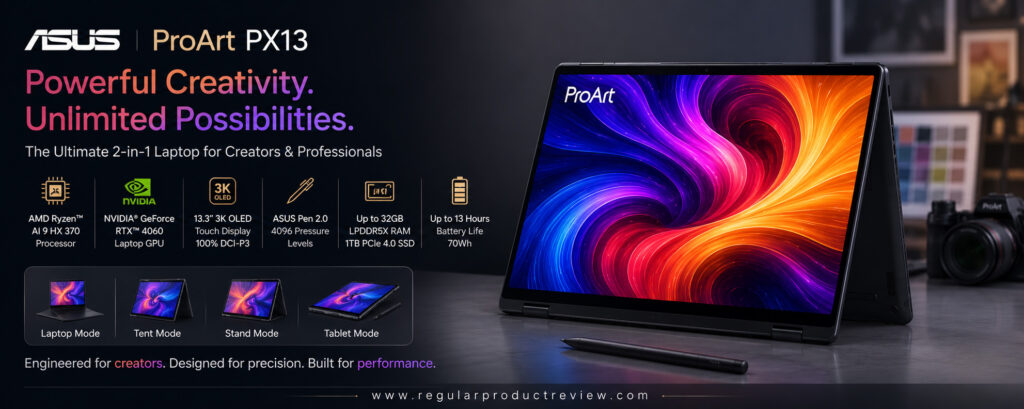
Performance is where the ProArt PX13 truly shines. Powered by AMD’s latest Ryzen AI processor alongside NVIDIA RTX graphics, the laptop comfortably handles Adobe Photoshop, Lightroom, Premiere Pro, DaVinci Resolve, Blender, AutoCAD, and other demanding creative software. AI-assisted workflows run significantly faster thanks to the dedicated Neural Processing Unit (NPU), while the RTX GPU accelerates rendering, image generation, and video editing tasks that would overwhelm most traditional ultraportables.
The stunning OLED touchscreen further enhances the creative experience. Colors appear incredibly vibrant and accurate, making the display suitable for professional photo editing, graphic design, and digital illustration. Combined with stylus compatibility, exceptional battery life, premium speakers, and modern connectivity, the ASUS ProArt PX13 stands out as one of the most capable creator-focused 2-in-1 laptops currently available.
Key Specifications
| Feature | Details |
|---|---|
| Display | 13.3-inch ASUS Lumina OLED Touch |
| Resolution | 2880 × 1800 |
| Refresh Rate | 120Hz |
| Processor | AMD Ryzen AI 9 HX |
| Graphics | NVIDIA GeForce RTX 4060 Laptop GPU |
| AI Engine | AMD Ryzen AI NPU |
| Memory | 32GB LPDDR5X |
| Storage | 1TB PCIe Gen4 SSD |
| Operating System | Windows 11 Pro |
| Battery Life | Up to 13 Hours |
| Weight | Approx. 1.38kg |
| Connectivity | USB4, USB-C, HDMI 2.1, SD Card Reader, Wi-Fi 7 |
Design & Build Quality
ASUS has created a beautifully engineered aluminum chassis that feels exceptionally durable while remaining compact enough for travel.
The precision-built 360-degree hinge inspires confidence, and the understated professional styling makes the laptop equally suitable for offices, studios, and classrooms.
Display Performance
The ASUS Lumina OLED touchscreen is one of the strongest features of the PX13.
Its exceptional color accuracy, deep blacks, excellent HDR support, and factory calibration make it an outstanding display for photographers, designers, and video editors.
Stylus input feels smooth and highly responsive.
Performance
The combination of AMD Ryzen AI 9 HX and NVIDIA RTX graphics delivers workstation-level performance.
Large Photoshop files, 4K video editing, AI image generation, Blender rendering, and multitasking all run remarkably smoothly while maintaining excellent overall responsiveness.
Keyboard, Stylus & Productivity
The keyboard offers comfortable travel and excellent feedback, making long editing sessions enjoyable.
Stylus support is highly accurate, allowing artists and designers to sketch naturally with minimal latency.
The large precision touchpad also feels responsive during everyday navigation.
Battery Life & Charging
Considering the powerful internal hardware, battery performance is impressive.
Fast USB-C charging allows users to quickly return to work during busy production schedules.
Software Experience
| Feature | Description |
|---|---|
| Windows 11 Pro | Modern and secure operating system. |
| ASUS ProArt Creator Hub | Performance tuning and creator optimization tools. |
| AMD Ryzen AI | Dedicated AI acceleration for creative workloads. |
| NVIDIA Studio Drivers | Optimized for professional creative software. |
| Stylus Support | Excellent digital illustration experience. |
| USB4 Connectivity | High-speed storage and external display support. |
Pros
| Advantages | Details |
|---|---|
| Outstanding creator performance | Powerful Ryzen AI processor with RTX graphics. |
| Beautiful OLED display | Professional-grade color accuracy. |
| Premium build quality | Durable and portable aluminum chassis. |
| Excellent stylus support | Great for artists and designers. |
| AI-ready hardware | Optimized for modern creative workflows. |
| Versatile convertible design | Flexible productivity and creativity. |
Cons
| Limitations | Details |
|---|---|
| Premium price | Professional hardware comes at a higher cost. |
| Battery life is shorter under heavy GPU workloads | Intensive rendering consumes more power. |
Who Should Buy It?
The ASUS ProArt PX13 is ideal for:
- Graphic designers
- Video editors
- Digital artists
- Photographers
- 3D creators
- Architects
- Creative professionals needing portable workstation performance
Bottom Line
The ASUS ProArt PX13 successfully bridges the gap between premium convertible laptops and professional creator workstations. Its powerful hardware, gorgeous OLED display, AI-ready platform, and exceptional flexibility make it one of the best 2-in-1 laptops for creative professionals in 2026.
6. Samsung Galaxy Book5 Pro 360
🏆 Award: Best 2-in-1 Laptop for Samsung Ecosystem Users
⭐⭐⭐⭐⭐ Editor’s Rating: 4.8/5
The Samsung Galaxy Book5 Pro 360 is the perfect convertible laptop for users who already own Samsung Galaxy smartphones, tablets, or wearables. While it delivers excellent performance as a standalone Windows laptop, its greatest strength lies in the seamless integration it offers across Samsung’s expanding ecosystem. Features like Multi Control, Second Screen, Quick Share, Samsung Notes synchronization, and Galaxy AI create a highly connected experience that significantly improves productivity and convenience.
The premium aluminum chassis is both elegant and lightweight, making it easy to carry throughout the day despite its spacious 16-inch display. Samsung’s engineering allows the laptop to remain remarkably thin while still feeling sturdy and durable. The 360-degree hinge operates smoothly and confidently, allowing users to switch effortlessly between Laptop Mode, Tablet Mode, Tent Mode, and Presentation Mode depending on their workflow.
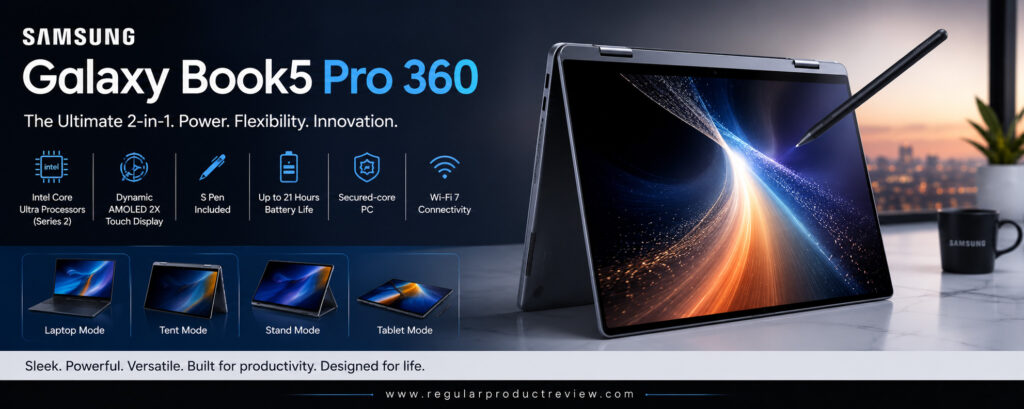
Powered by Intel’s latest Core Ultra processor, the Galaxy Book5 Pro 360 performs exceptionally well across productivity applications, office work, programming, multitasking, AI-powered Windows experiences, and everyday creative workloads. Combined with fast LPDDR5X memory and high-speed SSD storage, the system feels responsive regardless of workload.
The AMOLED touchscreen is arguably one of the laptop’s biggest highlights. Samsung’s display expertise results in vibrant colors, outstanding contrast, exceptional brightness, and superb HDR performance. Whether you’re editing photos, watching movies, sketching with the included S Pen, or simply browsing the web, the viewing experience is consistently excellent. Combined with long battery life, premium speakers, AI-powered features, and outstanding Galaxy ecosystem integration, the Galaxy Book5 Pro 360 remains one of the best premium 2-in-1 laptops available in 2026.
Key Specifications
| Feature | Details |
|---|---|
| Display | 16-inch Dynamic AMOLED 2X Touch |
| Resolution | 2880 × 1800 |
| Refresh Rate | 120Hz |
| Processor | Intel Core Ultra 7 |
| Graphics | Intel Arc Graphics |
| AI Engine | Intel AI Boost NPU |
| Memory | 16GB / 32GB LPDDR5X |
| Storage | 512GB / 1TB SSD |
| Operating System | Windows 11 Home |
| Battery Life | Up to 18 Hours |
| Weight | Approx. 1.69kg |
| Connectivity | Thunderbolt 4, USB-C, HDMI, microSD, Wi-Fi 7 |
Design & Build Quality
Samsung continues delivering one of the sleekest premium laptop designs available.
The lightweight aluminum chassis feels exceptionally well-built, while the slim profile makes it surprisingly portable for a 16-inch convertible laptop.
The included S Pen stores conveniently and complements the overall premium experience.
Display Performance
The Dynamic AMOLED 2X touchscreen is absolutely gorgeous.
Colors are vibrant, contrast is exceptional, HDR content looks stunning, and the adaptive 120Hz refresh rate makes navigation incredibly smooth.
This display is excellent for both productivity and entertainment.
Performance
Intel’s Core Ultra processor delivers excellent responsiveness across multitasking, office productivity, AI-assisted workflows, programming, and light creative work.
Samsung’s software optimizations further improve overall efficiency.
Keyboard, Stylus & Productivity
The spacious keyboard provides comfortable typing for long work sessions.
Samsung’s included S Pen offers an excellent writing and drawing experience with minimal latency, making note-taking and digital illustration effortless.
Battery Life & Charging
Battery performance is one of the Galaxy Book5 Pro 360’s greatest strengths.
Most users can comfortably complete an entire workday without searching for a charger, while USB-C fast charging minimizes downtime.
Software Experience
| Feature | Description |
|---|---|
| Windows 11 | Optimized Windows experience. |
| Samsung Galaxy AI | AI-powered productivity enhancements. |
| Samsung Notes | Seamless synchronization across Galaxy devices. |
| Quick Share | Fast wireless file transfers. |
| Multi Control | Control Galaxy devices using one keyboard and mouse. |
| S Pen Support | Outstanding handwriting and creative experience. |
Pros
| Advantages | Details |
|---|---|
| Gorgeous AMOLED display | One of the best laptop displays available. |
| Excellent battery life | Easily lasts a full workday. |
| Premium aluminum construction | Elegant and durable design. |
| Outstanding Galaxy ecosystem integration | Perfect for Samsung users. |
| Included S Pen | Excellent productivity and creativity tool. |
| Large immersive display | Great for multitasking and media consumption. |
Cons
| Limitations | Details |
|---|---|
| Best experience requires Samsung devices | Ecosystem benefits are reduced otherwise. |
| Larger footprint | Less portable than smaller 13- or 14-inch convertibles. |
Who Should Buy It?
The Samsung Galaxy Book5 Pro 360 is ideal for:
- Samsung Galaxy smartphone users
- Business professionals
- Students
- Remote workers
- Creative users
- Frequent travelers
- Anyone wanting a premium large-screen convertible laptop
Bottom Line
The Samsung Galaxy Book5 Pro 360 combines an outstanding AMOLED display, premium craftsmanship, long battery life, powerful Intel Core Ultra performance, and seamless Galaxy ecosystem integration into one of the most polished 2-in-1 laptops of 2026. For Samsung users, it’s one of the easiest premium Windows laptop recommendations available.
7. Acer Swift Go 14 Spin
🏆 Award: Best Value 2-in-1 Laptop
⭐⭐⭐⭐⭐ Editor’s Rating: 4.8/5
The Acer Swift Go 14 Spin proves that buyers don’t have to spend flagship-level money to enjoy a premium 2-in-1 laptop experience. Designed for students, professionals, remote workers, and everyday users, this convertible laptop offers an impressive balance of performance, portability, battery life, and modern AI-ready hardware at a significantly more affordable price than many premium competitors. It successfully delivers nearly everything most users need while maintaining excellent overall value.
One of the Swift Go 14 Spin’s greatest strengths is its versatility. The precision-engineered 360-degree hinge allows effortless switching between Laptop Mode, Tablet Mode, Tent Mode, and Presentation Mode, making it equally comfortable for taking notes during class, giving presentations at work, streaming movies, or browsing the web from the couch. Combined with its lightweight construction, the laptop is easy to carry throughout the day without becoming a burden during travel or commuting.
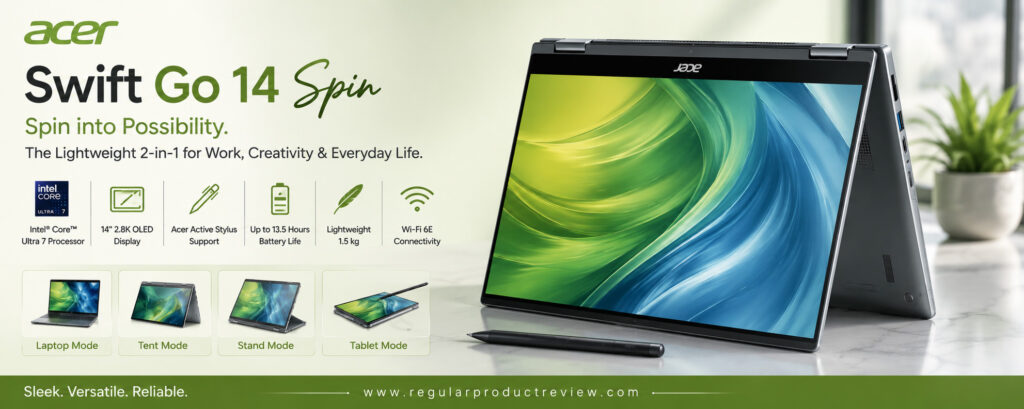
Performance is surprisingly impressive for its price category. Powered by Intel’s latest Core Ultra processor, the Swift Go handles productivity applications, Microsoft Office, programming, web browsing, multitasking, video conferencing, and even light creative workloads with ease. Windows 11 feels fast and responsive, while Intel’s integrated AI engine enhances productivity features designed for the next generation of Windows computing.
The OLED touchscreen is another major highlight. Colors appear vibrant, contrast is excellent, and touch responsiveness is highly accurate whether using your fingers or an active stylus. Combined with comfortable keyboard ergonomics, dependable battery life, modern connectivity, and premium design, the Acer Swift Go 14 Spin delivers exceptional value for anyone looking for a capable and affordable convertible laptop in 2026.
Key Specifications
| Feature | Details |
|---|---|
| Display | 14-inch OLED Multi-Touch |
| Resolution | 2880 × 1800 |
| Refresh Rate | 90Hz |
| Processor | Intel Core Ultra 7 |
| Graphics | Intel Arc Graphics |
| AI Engine | Intel AI Boost NPU |
| Memory | 16GB LPDDR5X |
| Storage | 1TB PCIe Gen4 SSD |
| Operating System | Windows 11 Home |
| Battery Life | Up to 14 Hours |
| Weight | Approx. 1.45kg |
| Connectivity | Thunderbolt 4, USB-C, HDMI, Wi-Fi 7, Bluetooth 5.4 |
Design & Build Quality
The Swift Go 14 Spin features a clean aluminum chassis that feels far more premium than its price suggests.
Its durable construction, slim profile, and sturdy 360-degree hinge inspire confidence during everyday use while remaining highly portable for students and professionals.
Display Performance
The OLED touchscreen offers vibrant colors, sharp detail, deep contrast, and excellent viewing angles.
Whether you’re working on assignments, watching HDR content, editing photos, or sketching notes, the display consistently delivers an enjoyable viewing experience.
Performance
Powered by Intel Core Ultra 7, the Swift Go easily handles office productivity, multitasking, online meetings, light creative work, programming, and AI-assisted Windows features.
Everyday responsiveness remains smooth even with multiple applications running simultaneously.
Keyboard, Stylus & Productivity
The keyboard offers comfortable typing with well-spaced keys, making long work sessions enjoyable.
The precision touchpad responds accurately, while stylus compatibility allows convenient handwritten notes and document annotation.
Battery Life & Charging
Battery life comfortably supports an entire day of productivity for most users.
USB-C fast charging also helps reduce downtime when traveling or working away from the office.
Software Experience
| Feature | Description |
|---|---|
| Windows 11 Home | Modern and user-friendly operating system. |
| Intel AI Boost | AI-powered productivity features. |
| Windows Hello | Fast biometric login support. |
| AcerSense | System optimization and maintenance tools. |
| Stylus Support | Natural handwriting and note-taking experience. |
| Thunderbolt 4 | High-speed connectivity and charging. |
Pros
| Advantages | Details |
|---|---|
| Outstanding value | Premium features at an affordable price. |
| Beautiful OLED touchscreen | Excellent image quality and touch response. |
| Strong everyday performance | Handles multitasking with ease. |
| Comfortable keyboard | Great for productivity. |
| Lightweight and portable | Easy to carry throughout the day. |
| Modern AI-ready hardware | Future-focused Windows experience. |
Cons
| Limitations | Details |
|---|---|
| Not designed for heavy professional rendering | Better suited for productivity than workstation tasks. |
| Speakers are average | External speakers improve multimedia experiences. |
Who Should Buy It?
The Acer Swift Go 14 Spin is ideal for:
- Students
- Teachers
- Office professionals
- Remote workers
- Everyday users
- Budget-conscious buyers
- Anyone seeking premium value
Bottom Line
The Acer Swift Go 14 Spin delivers one of the best price-to-performance ratios in the convertible laptop market. With a premium OLED touchscreen, modern Intel hardware, dependable battery life, and versatile 360-degree design, it’s an outstanding choice for buyers who want maximum value without sacrificing quality.
8. LG Gram Pro 2-in-1
🏆 Award: Best Lightweight Large-Screen 2-in-1 Laptop
⭐⭐⭐⭐⭐ Editor’s Rating: 4.9/5
The LG Gram Pro 2-in-1 is proof that a large-screen convertible laptop doesn’t have to be bulky or difficult to carry. LG continues pushing the limits of portability by combining a spacious 16-inch OLED touchscreen with an incredibly lightweight magnesium alloy chassis, creating one of the most travel-friendly premium laptops available today. It is an excellent choice for professionals, business travelers, students, and creators who want maximum screen space without sacrificing portability.
Despite its impressively thin and lightweight construction, the Gram Pro feels remarkably durable thanks to its military-grade design standards. The sturdy 360-degree hinge allows seamless transitions between Laptop Mode, Tablet Mode, Presentation Mode, and Tent Mode, making the laptop equally suitable for office work, presentations, note-taking, entertainment, and creative projects.
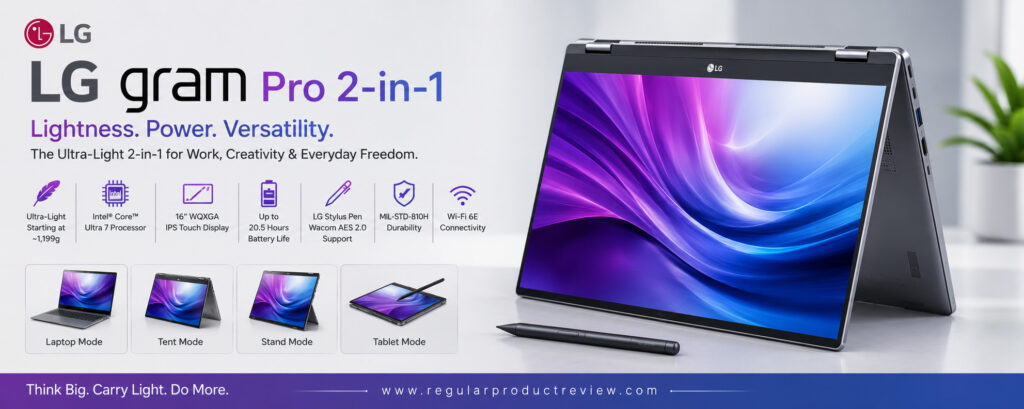
Performance is equally impressive. Equipped with Intel’s latest Core Ultra processor, fast LPDDR5X memory, and PCIe Gen4 SSD storage, the Gram Pro easily handles productivity software, programming, multitasking, AI-powered Windows experiences, photo editing, and everyday creative applications. Its efficient cooling system also helps maintain consistent performance during extended work sessions.
The 16-inch OLED touchscreen is undoubtedly one of the laptop’s biggest strengths. The larger display provides significantly more workspace for spreadsheets, creative applications, multitasking, and media consumption, while OLED technology delivers stunning colors, perfect blacks, and exceptional HDR performance. Combined with excellent battery life, premium keyboard comfort, modern connectivity, stylus support, and LG’s reputation for ultra-light laptops, the Gram Pro 2-in-1 stands out as one of the most versatile large-screen convertibles available in 2026.
Key Specifications
| Feature | Details |
|---|---|
| Display | 16-inch OLED Touch |
| Resolution | 2880 × 1800 |
| Refresh Rate | 120Hz |
| Processor | Intel Core Ultra 7 |
| Graphics | Intel Arc Graphics |
| AI Engine | Intel AI Boost NPU |
| Memory | 32GB LPDDR5X |
| Storage | 1TB PCIe Gen4 SSD |
| Operating System | Windows 11 Pro |
| Battery Life | Up to 18 Hours |
| Weight | Approx. 1.39kg |
| Connectivity | Thunderbolt 4, USB-C, HDMI, microSD, Wi-Fi 7 |
Design & Build Quality
LG continues to redefine lightweight laptop design.
The magnesium alloy chassis feels remarkably strong while remaining significantly lighter than most competing 16-inch convertible laptops.
Its premium finish and solid hinge inspire confidence during everyday use.
Display Performance
The large OLED touchscreen offers outstanding brightness, deep blacks, vibrant colors, and exceptional HDR performance.
The spacious 16-inch display greatly improves multitasking, content creation, spreadsheet work, and movie watching.
Performance
The Intel Core Ultra processor delivers excellent responsiveness for productivity, creative software, multitasking, programming, and AI-assisted workflows.
Performance remains consistently smooth even during demanding daily workloads.
Keyboard, Stylus & Productivity
LG’s full-size keyboard provides excellent typing comfort with generous spacing.
Stylus support allows users to sketch ideas, annotate documents, and take handwritten notes naturally.
The larger touchpad also improves overall navigation.
Battery Life & Charging
Battery life is among the best in its category.
Even with the large OLED display, most users can comfortably complete an entire workday before needing to recharge.
Software Experience
| Feature | Description |
|---|---|
| Windows 11 Pro | Secure and productivity-focused operating system. |
| Intel AI Boost | AI-enhanced Windows experiences. |
| Windows Hello | Fast facial recognition and security. |
| LG Smart Assistant | System management utilities. |
| Stylus Support | Excellent note-taking and illustration. |
| Thunderbolt 4 | High-speed data transfer and charging. |
Pros
| Advantages | Details |
|---|---|
| Extremely lightweight | One of the lightest 16-inch laptops available. |
| Gorgeous OLED display | Outstanding image quality. |
| Excellent battery life | Easily lasts throughout a workday. |
| Spacious display | Great for productivity and creativity. |
| Premium build quality | Durable magnesium alloy chassis. |
| Strong multitasking performance | Excellent everyday responsiveness. |
Cons
| Limitations | Details |
|---|---|
| Premium pricing | Costs more than many mainstream convertibles. |
| Integrated graphics only | Not intended for intensive AAA gaming. |
Who Should Buy It?
The LG Gram Pro 2-in-1 is ideal for:
- Business professionals
- Frequent travelers
- University students
- Content creators
- Remote workers
- Executives
- Anyone wanting a large yet lightweight convertible laptop
Bottom Line
The LG Gram Pro 2-in-1 successfully combines a beautiful 16-inch OLED touchscreen, impressive battery life, premium portability, and excellent productivity performance into one remarkably lightweight package. For users who want maximum screen space without carrying a heavy laptop, it remains one of the best premium 2-in-1 laptops you can buy in 2026.
Detailed Buying Guide
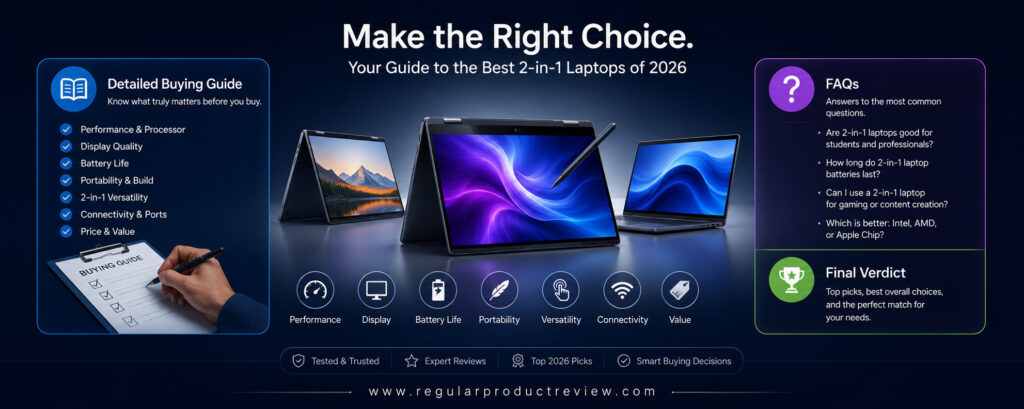
Buying a 2-in-1 laptop in 2026 is about much more than choosing the fastest processor or the highest-resolution display. Today’s premium convertible laptops are designed to replace both a traditional laptop and a tablet, giving users greater flexibility without sacrificing performance. Whether you’re a student attending online classes, a professional working remotely, a business executive traveling frequently, or a creative professional sketching digital artwork, selecting the right 2-in-1 laptop requires understanding which features matter most for your workflow.
Unlike conventional laptops, convertible devices are expected to perform multiple roles throughout the day. One moment you may be typing documents in Laptop Mode, the next you could be presenting slides in Tent Mode, taking handwritten notes in Tablet Mode, or watching movies in Stand Mode. That versatility is what makes 2-in-1 laptops one of the fastest-growing categories in premium computing.
To help you choose wisely, we’ve broken down the most important buying factors every shopper should consider before investing in a new convertible laptop.
Processor Performance
The processor is the heart of every laptop. It determines how quickly applications open, how smoothly multitasking performs, and how future-proof your laptop will remain over the next several years.
Modern AI-powered processors also include dedicated NPUs (Neural Processing Units), enabling Windows AI features while improving battery efficiency.
| Processor | Best For |
|---|---|
| Qualcomm Snapdragon X Elite | Maximum battery life and AI-powered productivity |
| Intel Core Ultra 9 | Heavy multitasking, creators, professionals |
| Intel Core Ultra 7 | Everyday productivity and business users |
| AMD Ryzen AI 9 HX | Designers, creators, AI workflows, rendering |
| Intel Core Ultra 5 | Students and general everyday computing |
Recommendation:
For most buyers, Intel Core Ultra 7 or Snapdragon X Elite offers the best balance between performance and battery life.
Display Quality
Since you’ll spend hours looking at your laptop screen, display quality should be one of your highest priorities.
Modern OLED touchscreens deliver incredible image quality while making handwriting and drawing feel much more natural.
| Display Feature | Why It Matters |
|---|---|
| OLED Panel | Superior colors, contrast, and HDR performance |
| 120Hz Refresh Rate | Smoother scrolling, animations, and pen input |
| Touchscreen | Enables tablet functionality |
| HDR Support | Better movies and creative work |
| High Brightness | Easier outdoor usage |
| Color Accuracy | Essential for photographers and designers |
If you’re a creator, always prioritize OLED displays with excellent color accuracy.
Convertible Design
The defining feature of every 2-in-1 laptop is flexibility.
Different manufacturers offer different designs depending on how users prefer to work.
| Design | Best For |
|---|---|
| 360° Convertible | Professionals, students, general users |
| Detachable Keyboard | Maximum portability and tablet use |
| Tent Mode | Presentations and media viewing |
| Stand Mode | Entertainment and video conferencing |
| Tablet Mode | Drawing, note-taking, reading |
Choose a design that matches your everyday workflow.
Stylus Support
If you regularly write notes, annotate documents, sign PDFs, sketch ideas, or create digital artwork, stylus support becomes one of the most valuable features.
A high-quality digital pen should offer:
- Low latency
- Excellent palm rejection
- Pressure sensitivity
- Tilt recognition
- Comfortable handwriting
Students, teachers, architects, engineers, and artists benefit the most from active stylus support.
Battery Life
Battery life determines how practical your laptop will be during travel, meetings, classes, or long workdays.
| Usage Style | Recommended Battery |
|---|---|
| Students | 10–12+ Hours |
| Office Work | 12–15 Hours |
| Remote Workers | 14–16 Hours |
| Travelers | 15–18+ Hours |
| Creative Professionals | 10–14 Hours |
If portability is important, prioritize efficiency over raw benchmark numbers.
Build Quality
Premium materials not only improve appearance but also increase durability.
Look for laptops built with:
| Material | Benefit |
|---|---|
| Aluminum | Premium feel and durability |
| Magnesium Alloy | Lightweight with excellent strength |
| Gorilla Glass | Better display protection |
| Precision Hinges | Smooth long-term operation |
| MIL-STD Certification | Better durability during travel |
A quality hinge is especially important because 2-in-1 laptops are opened and folded much more frequently than traditional notebooks.
Keyboard & Touchpad
Even the most powerful laptop becomes frustrating if typing isn’t comfortable.
Things to look for:
- Comfortable key travel
- Large precision touchpad
- Backlit keyboard
- Quiet typing
- Strong palm rejection
Professionals who type for hours every day should prioritize keyboard quality just as much as processor performance.
Connectivity
Modern laptops should support fast charging, external displays, and future accessories.
Recommended ports include:
| Port | Purpose |
|---|---|
| Thunderbolt 4 / USB4 | Fast storage, docks, monitors |
| USB-C | Charging and accessories |
| HDMI | External displays |
| microSD / SD Card | Photography workflows |
| Wi-Fi 7 | Faster wireless networking |
| Bluetooth 5.4 | Better wireless accessories |
Professionals who connect multiple monitors should prioritize Thunderbolt support.
AI Features
2026 is becoming the year of AI-powered laptops.
Modern NPUs improve:
- Microsoft Copilot
- Windows Studio Effects
- AI-powered productivity
- Video conferencing
- Background noise removal
- Live captions
- Image generation
- Local AI processing
Choosing an AI-ready laptop helps extend its lifespan.
Which Laptop Should You Buy?
| If You Want… | Best Choice |
|---|---|
| Best Overall | Microsoft Surface Pro 12 (2026) |
| Best Premium Convertible | HP Spectre x360 14 (2026) |
| Best for Creators | Lenovo Yoga 9i Gen 11 |
| Best Productivity Laptop | Dell XPS 14 2-in-1 |
| Best Creative Workstation | ASUS ProArt PX13 |
| Best Samsung Ecosystem Laptop | Samsung Galaxy Book5 Pro 360 |
| Best Value | Acer Swift Go 14 Spin |
| Best Lightweight Large Laptop | LG Gram Pro 2-in-1 |
Frequently Asked Questions (FAQs)
Which is the best 2-in-1 laptop in 2026?
The Microsoft Surface Pro 12 (2026) is our overall top recommendation because it offers excellent portability, outstanding battery life, AI-powered performance, premium build quality, and unmatched tablet flexibility.
Which 2-in-1 laptop is best for students?
The Acer Swift Go 14 Spin offers the best balance of affordability, performance, touchscreen functionality, and battery life for students.
Which laptop is best for digital artists?
The ASUS ProArt PX13 is our top recommendation thanks to its OLED display, RTX graphics, stylus support, and creator-focused hardware.
Which 2-in-1 laptop has the best display?
The Samsung Galaxy Book5 Pro 360 and HP Spectre x360 14 feature some of the best OLED touch displays available today.
Are 2-in-1 laptops good for programming?
Yes.
Modern Intel Core Ultra, AMD Ryzen AI, and Snapdragon X Elite processors provide more than enough performance for programming, software development, and multitasking.
Can a 2-in-1 laptop replace a tablet?
Absolutely.
Modern convertible laptops can switch between Laptop Mode and Tablet Mode, making them suitable for note-taking, reading, sketching, presentations, and entertainment.
Is an OLED display worth it?
Yes.
OLED displays provide significantly better colors, deeper blacks, higher contrast, and a much better HDR experience compared to traditional LCD panels.
Which 2-in-1 laptop offers the longest battery life?
The Samsung Galaxy Book5 Pro 360 and Microsoft Surface Pro 12 deliver some of the longest battery life among premium convertible laptops.
Final Verdict
The 2-in-1 laptop market has matured significantly in 2026, giving buyers more excellent choices than ever before. Whether your priority is portability, creativity, productivity, entertainment, or professional workloads, today’s premium convertible laptops are capable of replacing both a traditional notebook and a tablet without compromise.
For most users, the Microsoft Surface Pro 12 (2026) earns our Editor’s Choice award. Its lightweight detachable design, excellent OLED display, AI-powered Snapdragon X Elite processor, exceptional battery life, and unmatched versatility make it the best overall 2-in-1 laptop for the majority of buyers.
Professionals seeking a luxurious Windows experience should strongly consider the HP Spectre x360 14 (2026), while creative users will appreciate the outstanding OLED display and workstation-level performance offered by the ASUS ProArt PX13.
The Lenovo Yoga 9i Gen 11 continues to be one of the best premium convertibles for creators, whereas the Dell XPS 14 2-in-1 remains an excellent choice for productivity-focused professionals who value premium craftsmanship and reliable performance.
Samsung users will enjoy the seamless ecosystem integration of the Galaxy Book5 Pro 360, while the Acer Swift Go 14 Spin proves that buyers can still enjoy a premium convertible experience without spending flagship-level money.
Finally, for professionals who want the largest possible workspace without sacrificing portability, the LG Gram Pro 2-in-1 delivers an outstanding combination of lightweight design, beautiful OLED visuals, excellent battery life, and everyday productivity.
No matter which laptop you choose from this guide, every model offers premium build quality, touchscreen flexibility, AI-ready hardware, and years of dependable performance. By matching your budget and workflow with the right device, you’ll be investing in a laptop that can handle work, creativity, learning, and entertainment for many years to come.