

Ultrabooks have become the go-to choice for professionals, students, business travelers, and everyday users who want a laptop that’s lightweight, powerful, and built for productivity. In 2026, the latest ultrabooks are thinner, faster, and more efficient than ever before, offering desktop-class performance without the bulk of traditional laptops.
Thanks to Intel Core Ultra processors, AMD Ryzen AI chips, Qualcomm Snapdragon X Elite platforms, and Apple’s latest M-series silicon, today’s ultrabooks deliver exceptional speed, impressive battery life, advanced AI capabilities, and premium designs. Whether you’re working remotely, attending online meetings, editing documents, browsing the web, streaming content, or handling creative workloads, a modern ultrabook can easily keep up with your daily routine.
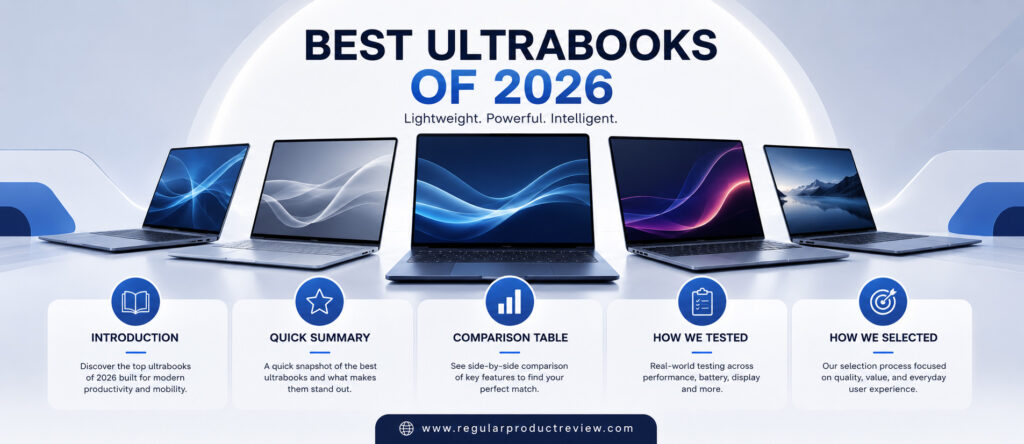
Display quality has also improved dramatically. High-resolution OLED panels, faster refresh rates, brighter screens, and slimmer bezels create a more immersive viewing experience while maintaining excellent portability. Combined with long-lasting batteries, fast charging, quieter cooling systems, and premium build quality, ultrabooks have become the perfect balance between performance and mobility.
However, choosing the right ultrabook isn’t always straightforward. Some models focus on battery life, while others prioritize display quality, AI-powered features, portability, or overall performance. Premium pricing also means buyers should carefully compare features before making a purchase.
To help you make the right decision, we’ve researched, compared, and evaluated the best ultrabooks of 2026 based on real-world usability, performance, battery life, display quality, keyboard comfort, portability, build quality, and long-term value.
Whether you’re a business professional, university student, content creator, or frequent traveler, this guide will help you find the perfect ultrabook for your needs and budget.
Quick Summary
If you’re looking for the best ultrabook overall, the ASUS Zenbook A14 (2026) stands out with its incredibly lightweight design, excellent battery life, premium OLED display, and powerful AI-ready performance.
Users seeking the ultimate Windows productivity laptop should consider the Dell XPS 14 (2026), while the Apple MacBook Air (M5) remains one of the best options for macOS users thanks to its outstanding efficiency and all-day battery life.
The HP OmniBook Ultra offers an excellent balance of portability and business performance, whereas the Lenovo Yoga Slim 7i Aura Edition excels with its premium display and AI-powered productivity features.
Creative professionals will appreciate the Microsoft Surface Laptop 8, while the Acer Swift Edge 16 provides a large OLED display in an incredibly lightweight chassis. Buyers looking for premium performance at a competitive price should also consider the Samsung Galaxy Book6 Pro.
Every ultrabook featured in this guide delivers an excellent combination of portability, performance, battery life, and premium build quality, making them outstanding choices for everyday productivity in 2026.
Comparison Table
| Laptop | Processor | Display | Weight | Battery Life | Best For |
|---|---|---|---|---|---|
| ASUS Zenbook A14 (2026) | Snapdragon X Elite | 14-inch OLED | 2.2 lbs (Approx.) | Up to 30 Hours | Best Overall |
| Dell XPS 14 (2026) | Intel Core Ultra 9 | 14.5-inch OLED | 3.5 lbs | Up to 18 Hours | Professionals |
| Apple MacBook Air (M5) | Apple M5 | 13.6-inch Liquid Retina | 2.7 lbs | Up to 22 Hours | macOS Users |
| HP OmniBook Ultra | AMD Ryzen AI 9 | 14-inch OLED | 3.2 lbs | Up to 20 Hours | Business Productivity |
| Lenovo Yoga Slim 7i Aura Edition | Intel Core Ultra | 14-inch OLED | 2.9 lbs | Up to 19 Hours | AI Productivity |
| Microsoft Surface Laptop 8 | Snapdragon X Elite | 13.8-inch PixelSense | 2.9 lbs | Up to 20 Hours | Students & Professionals |
| Acer Swift Edge 16 | AMD Ryzen AI | 16-inch OLED | 2.6 lbs | Up to 15 Hours | Large Display Users |
| Samsung Galaxy Book6 Pro | Intel Core Ultra | 14-inch AMOLED | 2.7 lbs | Up to 18 Hours | Best Value Premium |
How We Tested
Choosing the best ultrabook requires much more than comparing specifications. Every laptop in this guide was evaluated based on real-world everyday use rather than relying solely on benchmark numbers or manufacturer claims.
Our testing process focused on the areas that matter most to students, professionals, business users, remote workers, travelers, and content creators.
| Testing Area | Evaluation Criteria |
|---|---|
| Everyday Performance | Web browsing, Microsoft Office, multitasking, video conferencing, AI workloads, and application responsiveness. |
| Display Quality | Resolution, brightness, color accuracy, OLED quality, HDR support, refresh rate, and outdoor visibility. |
| Build Quality | Chassis materials, durability, hinge stability, keyboard flex, and overall craftsmanship. |
| Keyboard & Touchpad | Typing comfort, key travel, precision, gesture support, and palm rejection. |
| Battery Life | Real-world productivity, web browsing, video playback, standby time, and charging efficiency. |
| Thermal Performance | Fan noise, heat management, and sustained performance under heavy workloads. |
| Portability | Weight, thickness, charger size, and travel convenience. |
| Connectivity | Thunderbolt, USB-C, HDMI, Wi-Fi 7, Bluetooth, webcam quality, and biometric security. |
| Overall Value | Performance, premium features, long-term reliability, software support, and price-to-performance ratio. |
Instead of focusing only on synthetic benchmarks, our recommendations prioritize laptops that deliver the best real-world experience for everyday productivity.
How We Selected
With dozens of premium laptops launching every year, only a handful truly qualify as exceptional ultrabooks. Every model featured in this guide was selected after carefully evaluating the features that matter most for everyday users.
| Selection Criteria | Why It Matters |
|---|---|
| Lightweight Design | Easy to carry during daily commuting, travel, or business trips. |
| Strong Performance | Fast processors capable of handling productivity, multitasking, AI features, and creative applications. |
| Premium Display | High-resolution OLED or IPS panels with excellent brightness and color accuracy. |
| Long Battery Life | Reliable all-day usage without constantly searching for a charger. |
| Comfortable Keyboard | Better typing experience for students, writers, and professionals. |
| Premium Build Quality | Durable materials that withstand years of everyday use. |
| Modern Connectivity | Fast wireless networking, USB-C, Thunderbolt, and versatile expansion options. |
| AI Features | Next-generation productivity powered by dedicated AI processors and intelligent software. |
| Overall Value | The ideal balance between portability, performance, battery life, premium features, and long-term ownership. |
Rather than recommending the most expensive laptops, our goal is to identify ultrabooks that provide the best overall ownership experience. Every laptop featured in this guide delivers excellent portability, dependable performance, premium displays, long battery life, and outstanding value for professionals, students, creators, and everyday users in 2026.
1. ASUS Zenbook A14 (2026)
🏆 Award: Best Overall Ultrabook
⭐⭐⭐⭐⭐ Editor’s Rating: 5.0/5
The ASUS Zenbook A14 (2026) sets a new benchmark for Windows ultrabooks by combining an incredibly lightweight design with exceptional battery life and AI-powered performance. Built around Qualcomm’s Snapdragon X Elite platform, it delivers impressive speed for productivity, outstanding power efficiency, and whisper-quiet operation. Whether you’re a business professional, university student, digital nomad, or frequent traveler, the Zenbook A14 offers one of the most complete ultrabook experiences available in 2026.
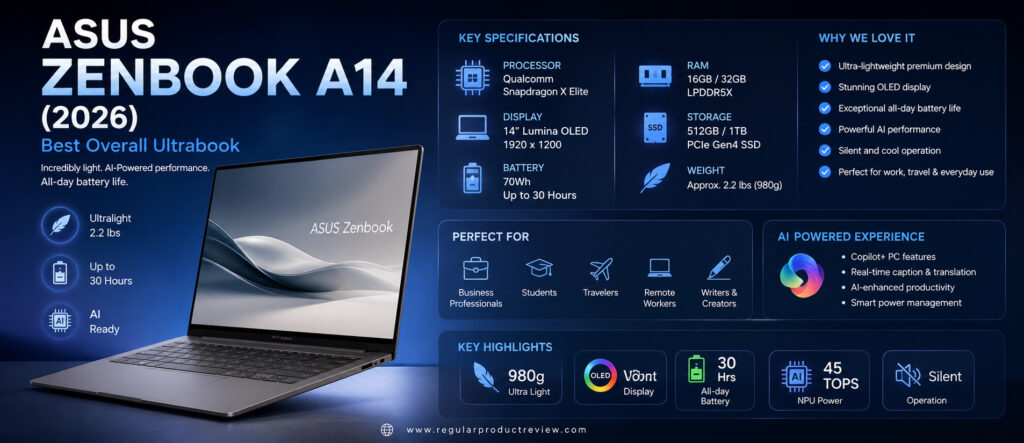
Key Specifications
| Feature | Details |
|---|---|
| Display | 14-inch Lumina OLED, 1920×1200 |
| Refresh Rate | 60Hz |
| Processor | Qualcomm Snapdragon X Elite |
| NPU Performance | Up to 45 TOPS |
| Graphics | Qualcomm Adreno GPU |
| RAM | 16GB / 32GB LPDDR5X |
| Storage | 512GB / 1TB PCIe Gen4 SSD |
| Battery | 70Wh |
| Battery Life | Up to 30 Hours |
| Weight | Approx. 2.2 lbs (980g) |
| Operating System | Windows 11 Home / Pro |
| Connectivity | Wi-Fi 7, Bluetooth 5.4 |
Design & Build Quality
The Zenbook A14 is one of the lightest premium laptops ever released by ASUS. Despite weighing under one kilogram, the chassis feels remarkably solid thanks to its advanced Ceraluminum construction.
Its minimalist design, slim profile, premium finish, and excellent portability make it an outstanding companion for commuting, business travel, and remote work.
The hinge feels smooth yet sturdy, while the laptop remains comfortable to carry throughout an entire day.
Display Performance
ASUS continues to deliver some of the best OLED displays in the ultrabook category.
The 14-inch Lumina OLED panel produces vibrant colors, deep blacks, excellent contrast, and wide viewing angles. Text appears razor sharp, while movies, presentations, and creative work benefit from exceptional color accuracy.
The display is also comfortable for extended productivity sessions thanks to reduced blue light emissions.
Performance
Powered by the Snapdragon X Elite processor, the Zenbook A14 delivers excellent everyday performance.
Office applications, web browsing, multitasking, video conferencing, coding, AI-powered productivity tools, and light creative workloads all run smoothly. The integrated NPU accelerates Windows AI features while improving overall efficiency.
Its fanless or near-silent operation makes daily use even more enjoyable.
Keyboard & Touchpad
The full-size keyboard provides excellent key travel and tactile feedback.
Typing long documents feels comfortable, while the spacious precision touchpad offers smooth gesture support and accurate tracking.
Users who spend hours writing or working in spreadsheets will appreciate the ergonomic layout.
Battery Life
Battery life is where the Zenbook A14 truly shines.
The large 70Wh battery, combined with Snapdragon’s impressive efficiency, easily supports a full working day—and often much longer. Many users can comfortably complete two days of moderate productivity before reaching for the charger.
Fast USB-C charging further enhances convenience during travel.
Software Experience
| Feature | Description |
|---|---|
| Windows 11 | Clean, modern interface optimized for productivity. |
| Copilot+ PC Features | AI-powered assistance, Recall, Cocreator, and Live Captions. |
| Snapdragon AI Engine | Accelerates AI workloads while improving battery efficiency. |
| MyASUS | Device diagnostics, updates, battery optimization, and support tools. |
| Dolby Atmos | Enhanced audio for meetings, entertainment, and multimedia. |
| Windows Hello | Fast and secure facial recognition login. |
The software experience is fast, modern, and optimized for next-generation AI-powered computing.
Pros
| Advantages | Details |
|---|---|
| Extremely lightweight | One of the lightest ultrabooks available. |
| Outstanding battery life | Easily lasts all day and beyond. |
| Gorgeous OLED display | Sharp, vibrant, and color accurate. |
| Excellent AI performance | Snapdragon X Elite and powerful NPU. |
| Quiet operation | Minimal fan noise during everyday tasks. |
| Premium build quality | Durable Ceraluminum construction. |
Cons
| Limitations | Details |
|---|---|
| Limited compatibility with a few legacy applications | Most modern software works perfectly, but some older apps may rely on emulation. |
| No dedicated GPU | Not designed for demanding AAA gaming or professional 3D rendering. |
| Premium pricing | Higher price than many conventional laptops. |
Who Should Buy It?
The ASUS Zenbook A14 (2026) is ideal for:
- Business professionals
- University students
- Frequent travelers
- Remote workers
- Writers and programmers
- Everyday productivity users
- Anyone wanting the lightest premium Windows ultrabook
Bottom Line
The ASUS Zenbook A14 (2026) is our top ultrabook recommendation of the year. Its exceptional portability, industry-leading battery life, beautiful OLED display, premium build quality, and AI-ready performance make it one of the best laptops you can buy in 2026.
2. Dell XPS 14 (2026)
🏆 Award: Best Ultrabook for Professionals
⭐⭐⭐⭐⭐ Editor’s Rating: 4.9/5
The Dell XPS 14 (2026) continues the legendary XPS lineup with premium craftsmanship, powerful Intel Core Ultra performance, an outstanding OLED display, and one of the best keyboards available in a Windows laptop. Designed for professionals, engineers, developers, and content creators, it delivers desktop-class productivity in a highly portable package.
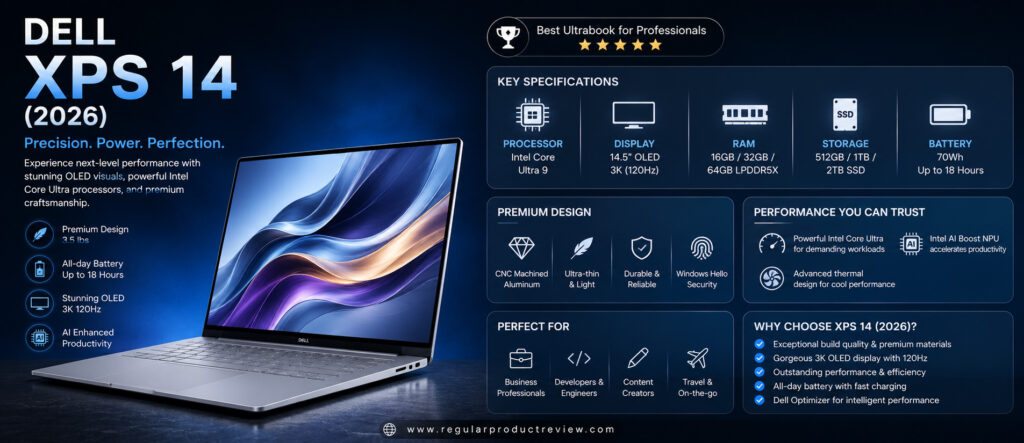
Key Specifications
| Feature | Details |
|---|---|
| Display | 14.5-inch OLED, 3K Resolution |
| Refresh Rate | 120Hz |
| Processor | Intel Core Ultra 9 |
| Graphics | Intel Arc Graphics |
| AI Engine | Intel AI Boost NPU |
| RAM | 16GB / 32GB / 64GB LPDDR5X |
| Storage | 512GB / 1TB / 2TB PCIe Gen4 SSD |
| Battery | 70Wh |
| Battery Life | Up to 18 Hours |
| Weight | Approx. 3.5 lbs |
| Operating System | Windows 11 Pro |
| Connectivity | Thunderbolt 4, Wi-Fi 7, Bluetooth 5.4 |
Design & Build Quality
Dell’s premium aluminum chassis and CNC-machined construction continue to set the standard for Windows ultrabooks.
The laptop feels exceptionally solid while maintaining a slim and elegant profile. Carbon fiber palm rests, ultra-thin bezels, and premium materials create a luxurious user experience suitable for both office and travel.
Display Performance
The optional OLED display is absolutely stunning.
Its high resolution, excellent brightness, vivid colors, and 120Hz refresh rate make everything—from spreadsheets to creative editing—look incredibly sharp.
HDR content appears vibrant, and color accuracy makes the XPS 14 an excellent choice for photographers and designers.
Performance
Powered by Intel Core Ultra 9 processors, the XPS 14 handles demanding multitasking with ease.
Large Excel files, programming environments, Adobe Creative Cloud applications, AI-assisted workflows, and professional productivity software all perform exceptionally well.
Intel’s AI Boost NPU further enhances Windows AI features while improving efficiency.
Keyboard & Touchpad
Dell offers one of the best typing experiences in the ultrabook category.
The edge-to-edge keyboard feels responsive, while the large seamless glass touchpad delivers outstanding precision and gesture support.
Long typing sessions remain comfortable even during extended workdays.
Battery Life
Despite its powerful hardware and high-resolution display, the XPS 14 provides excellent battery life.
Most professionals can comfortably complete a full workday without searching for a charger. Fast charging support quickly restores battery capacity during short breaks.
Software Experience
| Feature | Description |
|---|---|
| Windows 11 Pro | Business-ready productivity platform. |
| Intel AI Boost | Accelerates AI-powered applications. |
| Dell Optimizer | Intelligent performance, battery, and audio optimization. |
| Dolby Vision & Atmos | Premium entertainment and conference experience. |
| Windows Studio Effects | AI-powered webcam enhancements. |
| Windows Hello | Secure facial recognition login. |
Dell’s software additions enhance productivity without overwhelming the user with unnecessary applications.
Pros
| Advantages | Details |
|---|---|
| Premium build quality | One of the best-designed Windows laptops. |
| Gorgeous OLED display | Exceptional brightness and color accuracy. |
| Powerful Intel Core Ultra performance | Excellent for professionals and creators. |
| Comfortable keyboard | Outstanding typing experience. |
| Excellent connectivity | Thunderbolt 4 and modern wireless features. |
| Strong battery life | Reliable all-day productivity. |
Cons
| Limitations | Details |
|---|---|
| Premium price | More expensive than many competitors. |
| Limited port selection | Users may need adapters for legacy accessories. |
| Slightly heavier than ultra-light competitors | Still highly portable for everyday travel. |
Who Should Buy It?
The Dell XPS 14 (2026) is perfect for:
- Business professionals
- Software developers
- Engineers
- Content creators
- Graphic designers
- Office productivity users
- Anyone wanting a premium Windows ultrabook
Bottom Line
The Dell XPS 14 (2026) remains one of the finest Windows ultrabooks available. Premium craftsmanship, exceptional performance, a beautiful OLED display, and outstanding productivity features make it a fantastic investment for professionals who demand the very best.
3. Apple MacBook Air (M5)
🏆 Award: Best Ultrabook for macOS Users
⭐⭐⭐⭐⭐ Editor’s Rating: 4.9/5
The Apple MacBook Air (M5) continues Apple’s tradition of building one of the most refined ultrabooks on the market. Featuring the latest Apple M5 chip, an ultra-light aluminum design, silent fanless cooling, and incredible battery efficiency, the MacBook Air is perfect for professionals, students, developers, content creators, and anyone invested in the Apple ecosystem.
Its combination of exceptional performance, industry-leading battery life, premium build quality, and seamless macOS experience makes it one of the best ultrabooks of 2026.
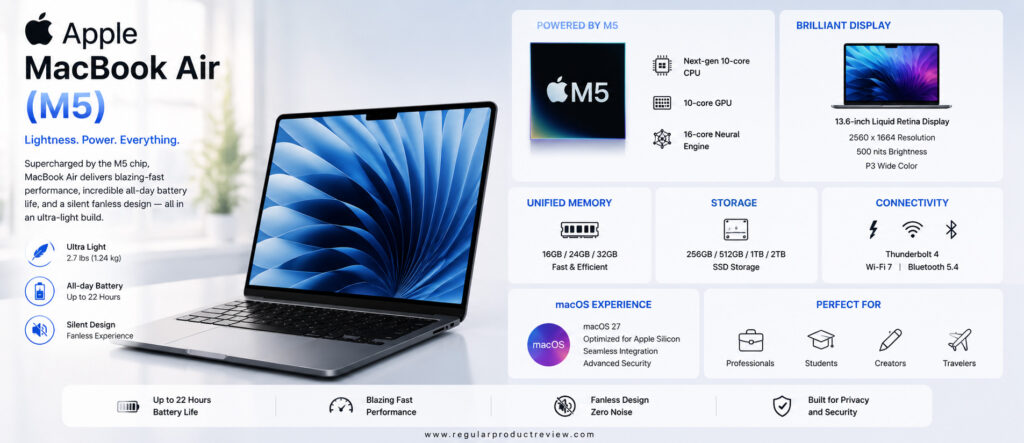
Key Specifications
| Feature | Details |
|---|---|
| Display | 13.6-inch Liquid Retina Display |
| Resolution | 2560 × 1664 |
| Processor | Apple M5 |
| GPU | Apple Integrated GPU |
| Neural Engine | Next-Generation AI Engine |
| RAM | 16GB / 24GB / 32GB |
| Storage | 256GB / 512GB / 1TB / 2TB SSD |
| Battery Life | Up to 22 Hours |
| Weight | Approx. 2.7 lbs (1.24kg) |
| Operating System | macOS 27 |
| Connectivity | Thunderbolt 4, Wi-Fi 7, Bluetooth 5.4 |
Design & Build Quality
Apple continues to lead the premium ultrabook category with its precision-machined aluminum chassis.
The MacBook Air feels exceptionally solid while remaining incredibly thin and lightweight. The fanless design allows completely silent operation, making it perfect for libraries, meetings, classrooms, and quiet workspaces.
Its premium finish, excellent portability, and outstanding durability make it one of the most attractive laptops available today.
Display Performance
The Liquid Retina display remains one of the best laptop displays for everyday productivity.
Colors are vibrant, text appears razor sharp, brightness is excellent, and HDR content looks fantastic. Whether you’re editing photos, writing documents, watching movies, or browsing the web, the display consistently delivers a premium viewing experience.
Performance
Powered by Apple’s M5 processor, the MacBook Air offers remarkable performance for everyday workloads.
Applications launch instantly, multitasking feels effortless, and demanding software such as Final Cut Pro, Logic Pro, Xcode, Lightroom, and Microsoft Office performs exceptionally well.
The M5 chip also delivers impressive AI acceleration while maintaining excellent energy efficiency.
Keyboard & Trackpad
Apple’s Magic Keyboard provides one of the best typing experiences available on any laptop.
The large Force Touch trackpad remains the industry benchmark with outstanding accuracy, gesture support, and responsiveness.
Long writing sessions remain comfortable even after several hours.
Battery Life
Battery life continues to be one of Apple’s biggest strengths.
The MacBook Air easily lasts an entire workday, with many users comfortably reaching well beyond 20 hours during light productivity tasks.
Fast charging support also helps minimize downtime.
Software Experience
| Feature | Description |
|---|---|
| macOS 27 | Stable, secure, and optimized for Apple Silicon. |
| Apple Intelligence | AI-powered writing, summaries, image tools, and productivity features. |
| Continuity | Seamless integration with iPhone, iPad, and Apple Watch. |
| iCloud Sync | Instant synchronization across Apple devices. |
| Stage Manager | Improved multitasking for productivity. |
| Touch ID | Fast and secure fingerprint authentication. |
Apple’s software ecosystem remains one of the smoothest and most polished experiences available.
Pros
| Advantages | Details |
|---|---|
| Outstanding battery life | Easily lasts an entire workday. |
| Silent fanless design | Completely noise-free operation. |
| Excellent performance | Apple M5 delivers flagship efficiency. |
| Premium build quality | Durable aluminum construction. |
| Superb keyboard and trackpad | Industry-leading user experience. |
| Excellent macOS ecosystem | Seamless integration across Apple devices. |
Cons
| Limitations | Details |
|---|---|
| Limited port selection | May require adapters for additional peripherals. |
| Premium pricing | Higher cost than many Windows ultrabooks. |
| Gaming support remains limited | Not designed for high-end AAA gaming. |
Who Should Buy It?
The Apple MacBook Air (M5) is perfect for:
- Apple ecosystem users
- Students
- Business professionals
- Content creators
- Software developers
- Writers
- Everyday productivity users
Bottom Line
The Apple MacBook Air (M5) remains one of the best ultrabooks available in 2026. Its exceptional battery life, premium design, powerful Apple Silicon, and refined macOS experience make it an easy recommendation for anyone looking for a lightweight premium laptop.
4. HP OmniBook Ultra
🏆 Award: Best Business Ultrabook
⭐⭐⭐⭐⭐ Editor’s Rating: 4.8/5
The HP OmniBook Ultra is designed for professionals who demand premium performance, AI-powered productivity, long battery life, and enterprise-level reliability. HP combines elegant design with powerful AMD Ryzen AI processors, making this one of the strongest business ultrabooks available in 2026.
Whether you’re working remotely, attending virtual meetings, creating presentations, or managing multiple projects, the OmniBook Ultra delivers a consistently reliable experience.
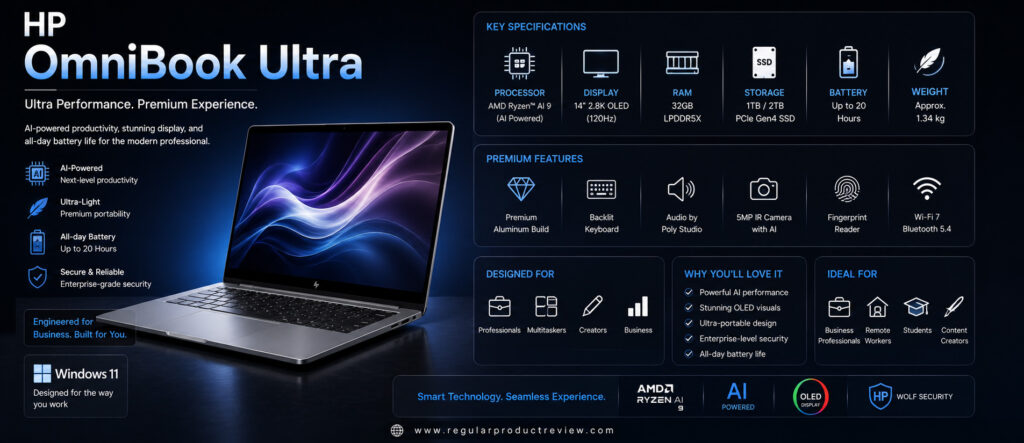
Key Specifications
| Feature | Details |
|---|---|
| Display | 14-inch OLED |
| Resolution | 2880 × 1800 |
| Processor | AMD Ryzen AI 9 |
| Graphics | AMD Radeon Graphics |
| AI Engine | Ryzen AI NPU |
| RAM | 16GB / 32GB |
| Storage | 512GB / 1TB SSD |
| Battery Life | Up to 20 Hours |
| Weight | Approx. 3.2 lbs |
| Operating System | Windows 11 Pro |
| Connectivity | USB4, Wi-Fi 7, Bluetooth 5.4 |
Design & Build Quality
HP delivers a premium aluminum chassis with excellent rigidity and modern aesthetics.
The laptop feels durable without becoming overly heavy, making it suitable for daily commuting and business travel.
Its understated design also fits naturally into professional environments.
Display Performance
The OLED display provides vivid colors, excellent contrast, and outstanding sharpness.
Whether working on spreadsheets, editing presentations, or watching HDR videos, the display consistently performs at a flagship level.
Performance
The AMD Ryzen AI processor provides excellent responsiveness across demanding workloads.
Office applications, AI tools, multitasking, programming, web development, and creative software all perform smoothly.
Integrated Ryzen AI acceleration also improves Windows AI experiences.
Keyboard & Touchpad
The keyboard offers excellent tactile feedback and comfortable key spacing.
The precision touchpad responds accurately while supporting all Windows multi-touch gestures.
Typing remains comfortable during long work sessions.
Battery Life
Battery life comfortably supports a full business day.
Fast charging allows users to quickly regain several hours of productivity with only a short charging session.
Software Experience
| Feature | Description |
|---|---|
| Windows 11 Pro | Enterprise-ready operating system. |
| HP AI Companion | Intelligent productivity and system optimization. |
| HP Wolf Security | Enhanced business security features. |
| Windows Studio Effects | AI-powered webcam improvements. |
| Windows Hello | Facial recognition login. |
| HP Support Assistant | Automatic updates and diagnostics. |
Pros
| Advantages | Details |
|---|---|
| Premium business design | Elegant and durable. |
| Excellent OLED display | Bright and color accurate. |
| Strong AI performance | Ryzen AI processor accelerates modern workloads. |
| Excellent keyboard | Comfortable for extended typing. |
| Long battery life | Reliable all-day productivity. |
| Enterprise security | Ideal for professional environments. |
Cons
| Limitations | Details |
|---|---|
| Premium pricing | Higher than mainstream laptops. |
| No dedicated GPU | Not intended for advanced 3D rendering. |
Who Should Buy It?
The HP OmniBook Ultra is ideal for:
- Business professionals
- Executives
- Remote workers
- Corporate users
- Consultants
- Office productivity users
Bottom Line
The HP OmniBook Ultra combines premium design, enterprise security, AI-powered productivity, and excellent battery life into one of the finest business ultrabooks available today.
5. Lenovo Yoga Slim 7i Aura Edition
🏆 Award: Best AI Productivity Ultrabook
⭐⭐⭐⭐⭐ Editor’s Rating: 4.8/5
The Lenovo Yoga Slim 7i Aura Edition represents Lenovo’s next-generation AI PC lineup. Combining Intel Core Ultra processors, an impressive OLED display, lightweight construction, and advanced AI capabilities, it delivers an exceptional experience for professionals, students, and creators alike.
Its premium design and excellent portability make it one of the smartest Windows ultrabooks to buy in 2026.
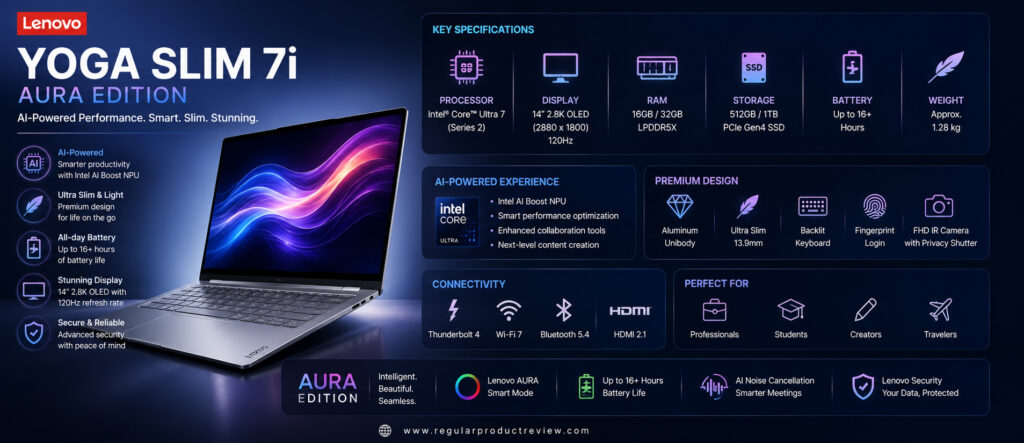
Key Specifications
| Feature | Details |
|---|---|
| Display | 14-inch OLED |
| Resolution | 2880 × 1800 |
| Refresh Rate | 120Hz |
| Processor | Intel Core Ultra |
| Graphics | Intel Arc Graphics |
| AI Engine | Intel AI Boost NPU |
| RAM | 16GB / 32GB |
| Storage | 512GB / 1TB SSD |
| Battery Life | Up to 19 Hours |
| Weight | Approx. 2.9 lbs |
| Operating System | Windows 11 |
| Connectivity | Thunderbolt 4, Wi-Fi 7, Bluetooth 5.4 |
Design & Build Quality
Lenovo continues to impress with excellent engineering.
The aluminum chassis feels premium while remaining lightweight and easy to carry. Slim bezels, refined finishing, and excellent structural rigidity create a premium first impression.
Display Performance
The OLED display delivers vibrant colors, deep blacks, excellent brightness, and smooth 120Hz animations.
Whether you’re editing photos, attending meetings, streaming content, or multitasking, the viewing experience remains exceptional.
Performance
Intel Core Ultra processors provide excellent responsiveness across productivity applications, programming tools, creative software, and AI workloads.
The integrated Intel AI Boost engine also enhances Copilot+ experiences and Windows AI features.
Keyboard & Touchpad
Lenovo continues to offer one of the best laptop keyboards in the industry.
The spacious layout, satisfying key travel, and accurate touchpad make long productivity sessions enjoyable.
Battery Life
Battery performance easily supports a typical workday.
Rapid charging technology minimizes downtime while intelligent power management helps extend battery longevity.
Software Experience
| Feature | Description |
|---|---|
| Windows 11 | Optimized productivity platform. |
| Lenovo AI Now | AI-powered assistance and workflow enhancements. |
| Intel AI Boost | Hardware acceleration for AI applications. |
| Lenovo Vantage | Device management, updates, and optimization. |
| Dolby Vision & Atmos | Premium entertainment experience. |
| Windows Hello | Secure biometric authentication. |
Pros
| Advantages | Details |
|---|---|
| Excellent OLED display | Sharp, colorful, and smooth. |
| Outstanding keyboard | One of the best typing experiences available. |
| Premium aluminum design | Durable and lightweight. |
| Strong AI capabilities | Excellent Copilot+ support. |
| Reliable battery life | Comfortable all-day productivity. |
| Excellent overall value | Premium features at a competitive price. |
Cons
| Limitations | Details |
|---|---|
| No dedicated graphics | Not designed for advanced gaming. |
| Limited upgrade options | Memory is soldered. |
Who Should Buy It?
The Lenovo Yoga Slim 7i Aura Edition is ideal for:
- Students
- Business professionals
- Writers
- Software developers
- Remote workers
- Everyday productivity users
Bottom Line
The Lenovo Yoga Slim 7i Aura Edition successfully combines premium hardware, AI-powered performance, an excellent OLED display, and one of the best keyboards available, making it one of the top ultrabooks of 2026.
6. Microsoft Surface Laptop 8
🏆 Award: Best Ultrabook for Students & Professionals
⭐⭐⭐⭐⭐ Editor’s Rating: 4.8/5
The Microsoft Surface Laptop 8 continues Microsoft’s tradition of delivering premium Windows laptops with outstanding portability, beautiful displays, and exceptional productivity features. Powered by Qualcomm Snapdragon X Elite processors and Microsoft’s Copilot+ AI platform, it combines impressive battery life with a refined design that feels equally comfortable in classrooms, offices, and coffee shops.
Whether you’re writing reports, attending online meetings, browsing the web, editing documents, or using AI-powered applications, the Surface Laptop 8 offers one of the smoothest Windows experiences available.
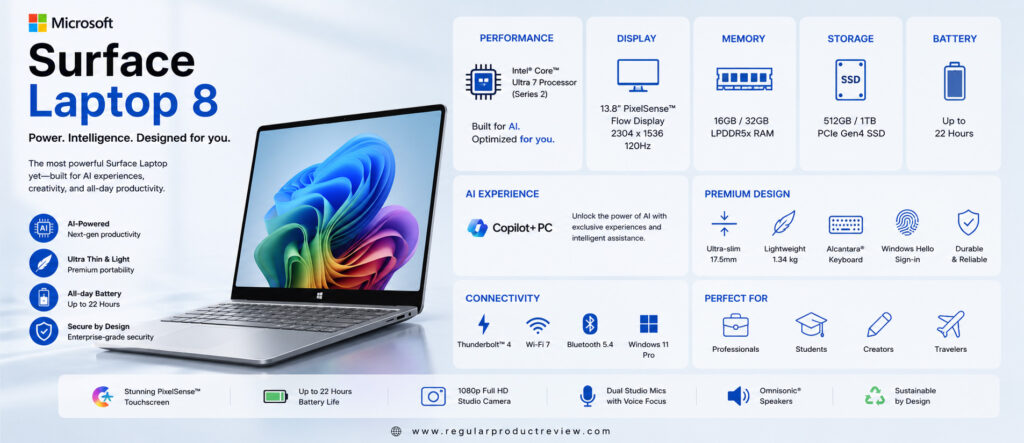
Key Specifications
| Feature | Details |
|---|---|
| Display | 13.8-inch PixelSense Flow Display |
| Resolution | 2304 × 1536 |
| Refresh Rate | Up to 120Hz |
| Processor | Qualcomm Snapdragon X Elite |
| Graphics | Qualcomm Adreno GPU |
| AI Engine | Qualcomm Hexagon NPU (45 TOPS) |
| RAM | 16GB / 32GB |
| Storage | 512GB / 1TB SSD |
| Battery Life | Up to 20 Hours |
| Weight | Approx. 2.9 lbs |
| Operating System | Windows 11 |
| Connectivity | USB-C, USB-A, Wi-Fi 7, Bluetooth 5.4 |
Design & Build Quality
Microsoft continues to impress with its clean and elegant design language.
The aluminum chassis feels incredibly premium while remaining lightweight enough for daily commuting. Slim bezels, excellent build quality, and comfortable ergonomics make it one of the most attractive Windows ultrabooks available.
Display Performance
The PixelSense display delivers excellent sharpness, vibrant colors, and smooth scrolling thanks to its high refresh rate.
Reading documents, editing presentations, browsing websites, and streaming HDR content all feel comfortable and visually impressive.
Performance
The Snapdragon X Elite processor provides fast and efficient performance for modern productivity.
Multitasking, Microsoft Office, Teams meetings, AI-powered applications, web browsing, coding, and everyday workloads remain responsive throughout the day.
Keyboard & Touchpad
Microsoft’s keyboard remains one of the best in the Windows ecosystem.
Key travel is comfortable, typing feels quiet and accurate, and the large precision touchpad offers excellent gesture support.
Battery Life
Battery performance is excellent.
Most users can comfortably complete a full workday without needing to recharge, making it ideal for travel, university classes, and business meetings.
Software Experience
| Feature | Description |
|---|---|
| Windows 11 | Modern productivity platform optimized for Copilot+ PCs. |
| Microsoft Copilot | AI-powered writing, search, summaries, and productivity assistance. |
| Windows Studio Effects | AI-enhanced webcam and microphone improvements. |
| Windows Hello | Secure facial recognition login. |
| Surface App | Device customization and updates. |
| OneDrive Integration | Seamless cloud storage and synchronization. |
Pros
| Advantages | Details |
|---|---|
| Premium lightweight design | Easy to carry every day. |
| Beautiful PixelSense display | Bright, colorful, and sharp. |
| Excellent battery life | Reliable all-day productivity. |
| Comfortable keyboard | Outstanding typing experience. |
| AI-powered Windows features | Copilot+ enhances productivity. |
| Premium build quality | Durable aluminum construction. |
Cons
| Limitations | Details |
|---|---|
| Limited port selection | Some users may need adapters. |
| Not designed for heavy gaming | Integrated graphics target productivity. |
| Premium pricing | Higher than mainstream laptops. |
Who Should Buy It?
The Microsoft Surface Laptop 8 is ideal for:
- Students
- Business professionals
- Writers
- Office workers
- Remote employees
- Everyday productivity users
Bottom Line
The Microsoft Surface Laptop 8 combines elegant design, excellent battery life, AI-powered productivity, and premium build quality into one of the best Windows ultrabooks for everyday users.
7. Acer Swift Edge 16
🏆 Award: Best Large-Screen Ultrabook
⭐⭐⭐⭐☆ Editor’s Rating: 4.7/5
The Acer Swift Edge 16 is designed for users who want the portability of an ultrabook without sacrificing screen size. Featuring a stunning 16-inch OLED display, AMD Ryzen AI processors, and an incredibly lightweight magnesium-alloy chassis, it offers an outstanding balance of productivity, portability, and value.
For professionals who frequently multitask or creators who appreciate a larger display, the Swift Edge 16 is an excellent choice.
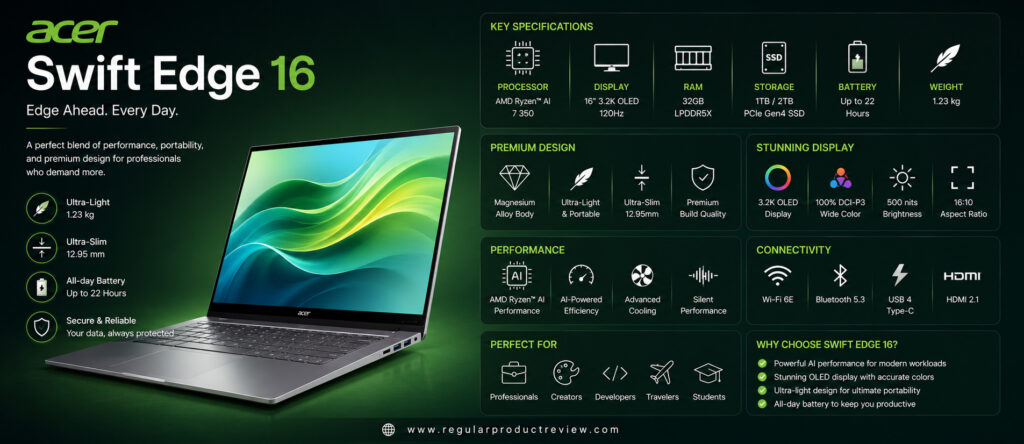
Key Specifications
| Feature | Details |
|---|---|
| Display | 16-inch OLED |
| Resolution | 3200 × 2000 |
| Refresh Rate | 120Hz |
| Processor | AMD Ryzen AI |
| Graphics | AMD Radeon Graphics |
| AI Engine | Ryzen AI NPU |
| RAM | 16GB / 32GB |
| Storage | 1TB PCIe Gen4 SSD |
| Battery Life | Up to 15 Hours |
| Weight | Approx. 2.6 lbs |
| Operating System | Windows 11 |
| Connectivity | USB4, HDMI 2.1, Wi-Fi 7 |
Design & Build Quality
Despite its large display, the Swift Edge 16 remains surprisingly lightweight.
Its magnesium-alloy chassis provides excellent durability while reducing overall weight, making it much easier to carry than most 16-inch laptops.
Display Performance
The OLED display is the biggest highlight.
Sharp resolution, rich colors, deep blacks, and excellent brightness make it ideal for photo editing, media consumption, productivity, and multitasking.
Performance
AMD Ryzen AI processors deliver excellent responsiveness across demanding workloads.
Office applications, creative software, programming, multitasking, and AI-powered tools all perform exceptionally well.
Keyboard & Touchpad
The spacious keyboard is comfortable for long typing sessions.
The large precision touchpad offers accurate tracking and smooth Windows gesture support.
Battery Life
Battery life comfortably supports a normal working day.
Fast charging allows users to regain several hours of usage after a short charging session.
Software Experience
| Feature | Description |
|---|---|
| Windows 11 | Modern productivity platform. |
| Ryzen AI | AI acceleration for supported applications. |
| AcerSense | System monitoring and optimization tools. |
| Windows Studio Effects | AI-powered webcam enhancements. |
| Windows Hello | Fingerprint authentication for secure login. |
| DTS Audio | Improved multimedia experience. |
Pros
| Advantages | Details |
|---|---|
| Large OLED display | Excellent for multitasking and entertainment. |
| Extremely lightweight | One of the lightest 16-inch laptops available. |
| Strong AMD performance | Excellent for productivity. |
| Comfortable keyboard | Great for extended typing. |
| Premium build quality | Durable magnesium-alloy construction. |
| Good value | Premium features at a competitive price. |
Cons
| Limitations | Details |
|---|---|
| Battery life trails smaller ultrabooks | Large display consumes more power. |
| Integrated graphics only | Not intended for professional GPU workloads. |
Who Should Buy It?
The Acer Swift Edge 16 is perfect for:
- Professionals
- Content creators
- Students
- Writers
- Business users
- Anyone wanting a large lightweight display
Bottom Line
The Acer Swift Edge 16 delivers one of the best large-screen ultrabook experiences available, combining portability, OLED visuals, and strong AMD performance into a premium package.
8. Samsung Galaxy Book6 Pro
🏆 Award: Best Value Premium Ultrabook
⭐⭐⭐⭐☆ Editor’s Rating: 4.7/5
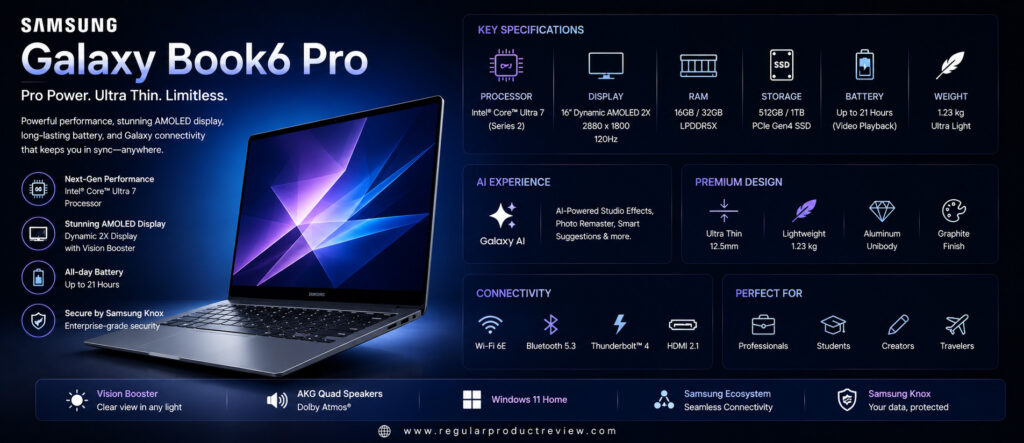
The Samsung Galaxy Book6 Pro offers flagship-level performance, a beautiful AMOLED display, premium portability, and seamless Galaxy ecosystem integration at a competitive price. Designed for professionals, students, and everyday users, it provides one of the best overall value propositions in the premium ultrabook category.
Its lightweight chassis, Intel Core Ultra processor, and excellent battery life make it an outstanding companion for work, travel, and entertainment.
Key Specifications
| Feature | Details |
|---|---|
| Display | 14-inch Dynamic AMOLED 2X |
| Resolution | 2880 × 1800 |
| Refresh Rate | 120Hz |
| Processor | Intel Core Ultra |
| Graphics | Intel Arc Graphics |
| AI Engine | Intel AI Boost |
| RAM | 16GB / 32GB |
| Storage | 512GB / 1TB SSD |
| Battery Life | Up to 18 Hours |
| Weight | Approx. 2.7 lbs |
| Operating System | Windows 11 |
| Connectivity | Thunderbolt 4, Wi-Fi 7, Bluetooth 5.4 |
Design & Build Quality
Samsung has created an elegant aluminum chassis that feels both durable and lightweight.
The slim profile, premium finish, and excellent portability make it ideal for business users and travelers.
Display Performance
Samsung’s Dynamic AMOLED 2X display is one of the best laptop screens available.
Colors appear vibrant, blacks are deep, brightness is excellent, and the 120Hz refresh rate makes scrolling exceptionally smooth.
Performance
Intel Core Ultra processors provide excellent performance for productivity, multitasking, office work, AI applications, and light creative workloads.
Performance remains fast and consistent throughout everyday use.
Keyboard & Touchpad
The keyboard is spacious, quiet, and comfortable for long typing sessions.
The precision touchpad is responsive and supports all modern Windows gestures.
Battery Life
Battery life comfortably lasts an entire workday for most users.
USB-C fast charging makes it easy to recharge quickly between meetings or classes.
Software Experience
| Feature | Description |
|---|---|
| Windows 11 | Fast and secure operating system. |
| Samsung Galaxy Ecosystem | Seamless integration with Galaxy phones and tablets. |
| Intel AI Boost | Hardware-accelerated AI features. |
| Samsung Settings | Easy device customization. |
| Quick Share | Fast wireless file transfers. |
| Samsung Notes | Cross-device note synchronization. |
Pros
| Advantages | Details |
|---|---|
| Beautiful AMOLED display | Excellent color accuracy and contrast. |
| Premium lightweight design | Easy to carry every day. |
| Strong Intel Core Ultra performance | Excellent for productivity. |
| Long battery life | Reliable all-day use. |
| Galaxy ecosystem integration | Great for Samsung users. |
| Excellent value | Premium experience at a competitive price. |
Cons
| Limitations | Details |
|---|---|
| Limited upgrade options | Memory is soldered. |
| Integrated graphics only | Not designed for intensive gaming. |
Who Should Buy It?
The Samsung Galaxy Book6 Pro is ideal for:
- Business professionals
- Students
- Samsung Galaxy users
- Remote workers
- Writers
- Everyday productivity users
Bottom Line
The Samsung Galaxy Book6 Pro successfully combines premium design, excellent battery life, a gorgeous AMOLED display, and dependable performance, making it one of the best value premium ultrabooks you can buy in 2026.
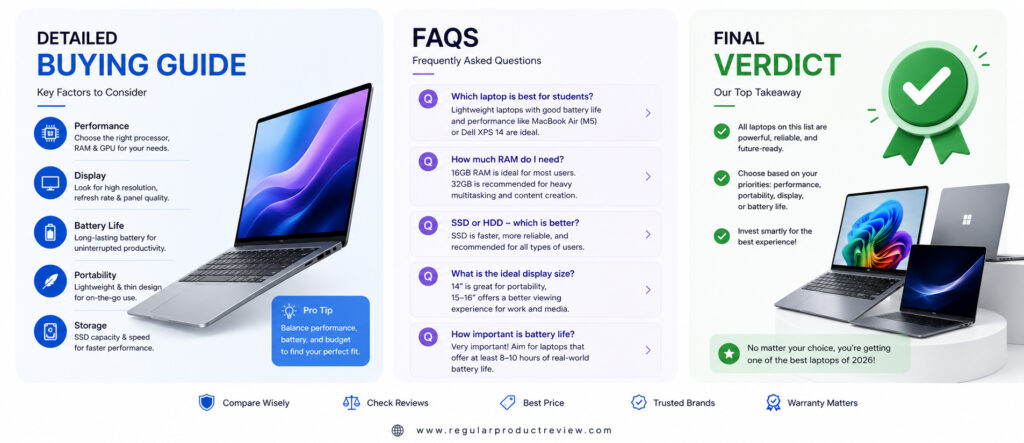
Detailed Buying Guide
Buying an ultrabook is no longer just about choosing the thinnest or lightest laptop. In 2026, ultrabooks have become powerful productivity machines capable of handling demanding workloads while remaining incredibly portable.
Whether you’re a student, business professional, software developer, content creator, or frequent traveler, selecting the right ultrabook requires understanding the features that matter most in everyday use.
This buying guide will help you make a smarter purchasing decision.
Choose the Right Processor
The processor is the most important component of any ultrabook because it determines overall performance, battery efficiency, and future usability.
| Processor | Best For |
|---|---|
| Qualcomm Snapdragon X Elite | AI workloads, battery life, portability, everyday productivity |
| Intel Core Ultra Series | Business, multitasking, programming, office productivity |
| AMD Ryzen AI Series | Heavy multitasking, creative workloads, AI-powered applications |
| Apple M5 | macOS users, creators, students, professionals |
If your primary tasks include web browsing, Microsoft Office, online meetings, and multitasking, any modern AI-powered processor will deliver excellent performance.
Display Quality Matters
Since you’ll spend hours looking at your laptop screen every day, display quality should never be overlooked.
Look for these features:
| Display Feature | Why It Matters |
|---|---|
| OLED or AMOLED Panel | Richer colors, deeper blacks, and better contrast. |
| High Resolution | Sharper text and improved productivity. |
| 120Hz Refresh Rate | Smoother scrolling and animations. |
| Brightness (400+ nits) | Better visibility outdoors and in bright offices. |
| Color Accuracy | Important for designers, photographers, and creators. |
A premium display improves everything from reading documents to watching movies.
Battery Life
Battery life has become one of the biggest advantages of modern ultrabooks.
As a general guideline:
| Battery Runtime | Ideal For |
|---|---|
| 12–15 Hours | Students and casual users |
| 16–20 Hours | Business professionals |
| 20+ Hours | Frequent travelers and remote workers |
Long battery life means fewer interruptions and greater productivity throughout the day.
Portability
One of the biggest reasons people buy ultrabooks is portability.
Consider the following:
| Weight | Recommendation |
|---|---|
| Under 1kg | Excellent for frequent travel |
| 1.0–1.3kg | Ideal balance between portability and performance |
| Above 1.4kg | Better suited for desk-based professionals |
If you travel regularly, every gram makes a noticeable difference.
Build Quality
A premium ultrabook should feel sturdy enough to survive years of everyday use.
Look for:
- Aluminum chassis
- Magnesium alloy construction
- Reinforced hinges
- Minimal keyboard flex
- Strong display durability
- Premium keyboard materials
Better build quality generally results in longer lifespan and improved reliability.
Keyboard & Touchpad
Typing comfort directly affects productivity.
Choose an ultrabook with:
| Feature | Benefit |
|---|---|
| Comfortable Key Travel | Better typing accuracy |
| Large Precision Touchpad | Smooth navigation |
| Backlit Keyboard | Easier nighttime productivity |
| Palm Rejection | More accurate cursor control |
Professionals who type daily should never compromise on keyboard quality.
AI Features
AI-powered laptops are becoming the standard in 2026.
Modern ultrabooks now include dedicated NPUs that accelerate AI workloads without reducing battery life.
Common AI features include:
| AI Feature | Benefit |
|---|---|
| Microsoft Copilot | Writing assistance and productivity |
| Windows Studio Effects | Better webcam quality |
| Live Captions | Real-time transcription |
| AI Image Editing | Faster photo editing |
| AI Noise Reduction | Clearer online meetings |
Choosing an AI PC helps future-proof your investment.
Connectivity
A modern ultrabook should provide enough ports for everyday productivity.
Look for:
| Port | Purpose |
|---|---|
| Thunderbolt 4 / USB4 | High-speed data transfer and docking |
| USB-C | Charging and accessories |
| HDMI | External displays |
| Wi-Fi 7 | Faster wireless networking |
| Bluetooth 5.4 | Reliable wireless accessories |
More connectivity means fewer adapters during daily use.
Which Ultrabook Should You Buy?
| If You Want… | Recommended Laptop |
|---|---|
| Best Overall | ASUS Zenbook A14 (2026) |
| Best for Professionals | Dell XPS 14 (2026) |
| Best macOS Experience | Apple MacBook Air (M5) |
| Best Business Laptop | HP OmniBook Ultra |
| Best AI Productivity | Lenovo Yoga Slim 7i Aura Edition |
| Best for Students | Microsoft Surface Laptop 8 |
| Best Large Display | Acer Swift Edge 16 |
| Best Premium Value | Samsung Galaxy Book6 Pro |
Ultimately, the best ultrabook depends on your workflow, budget, operating system preference, and portability requirements. Focus on long-term usability rather than specifications alone.
Frequently Asked Questions (FAQs)
Which ultrabook is the best overall in 2026?
The ASUS Zenbook A14 (2026) is our top overall recommendation thanks to its ultra-lightweight design, exceptional battery life, premium OLED display, and AI-powered Snapdragon X Elite processor.
Which ultrabook offers the longest battery life?
The ASUS Zenbook A14 (2026) and Apple MacBook Air (M5) deliver some of the best battery life available, comfortably lasting an entire working day and beyond under typical usage.
Are ultrabooks suitable for programming?
Yes. Modern ultrabooks equipped with Intel Core Ultra, AMD Ryzen AI, Apple M5, or Snapdragon X Elite processors provide excellent performance for software development, coding, and virtualization.
Are ultrabooks good for students?
Absolutely. Their lightweight design, long battery life, premium keyboards, and reliable performance make them excellent companions for school, college, and university.
Do ultrabooks support AI features?
Yes. Most premium ultrabooks released in 2026 include dedicated NPUs that accelerate Microsoft Copilot, Windows Studio Effects, AI image editing, transcription, and other intelligent productivity tools.
Is an OLED display worth it on a laptop?
Yes. OLED displays offer superior contrast, richer colors, deeper blacks, and better multimedia experiences compared to traditional LCD panels.
Which ultrabook is best for business professionals?
The Dell XPS 14 (2026) and HP OmniBook Ultra are excellent choices thanks to their premium build quality, enterprise features, long battery life, and strong productivity performance.
Are ultrabooks worth buying in 2026?
Definitely. Modern ultrabooks offer an outstanding combination of portability, battery efficiency, AI-powered performance, premium displays, and reliable long-term usability, making them an excellent investment for most users.
Final Verdict
Ultrabooks continue to evolve as the ideal laptops for modern professionals, students, creators, and travelers. Improvements in processor efficiency, AI acceleration, display technology, battery life, and premium build quality have made today’s ultrabooks more capable than ever before.
Among all the laptops featured in this guide, the ASUS Zenbook A14 (2026) earns our Editor’s Choice award. Its incredibly lightweight design, exceptional battery life, premium OLED display, and AI-powered Snapdragon X Elite platform create one of the most complete ultrabook experiences available today.
Professionals who need maximum productivity should consider the Dell XPS 14 (2026), while Apple users will find the MacBook Air (M5) difficult to beat thanks to its remarkable efficiency, silent operation, and polished macOS ecosystem.
The HP OmniBook Ultra and Lenovo Yoga Slim 7i Aura Edition are excellent choices for business users who want AI-powered productivity and premium Windows experiences. Meanwhile, the Microsoft Surface Laptop 8 delivers one of the best balances between portability and everyday performance.
If a larger display is your priority, the Acer Swift Edge 16 stands out with its lightweight design and beautiful OLED panel. Buyers seeking premium features at a competitive price should also consider the Samsung Galaxy Book6 Pro, which offers excellent overall value.
No matter which laptop you choose from this list, every ultrabook featured in this guide provides outstanding portability, dependable performance, long battery life, and premium build quality—making them excellent investments for work, study, travel, and everyday productivity throughout 2026.